5 Key Factors to Consider When Choosing Between Apple M1 68gb 7cores and NVIDIA 4080 16GB for AI
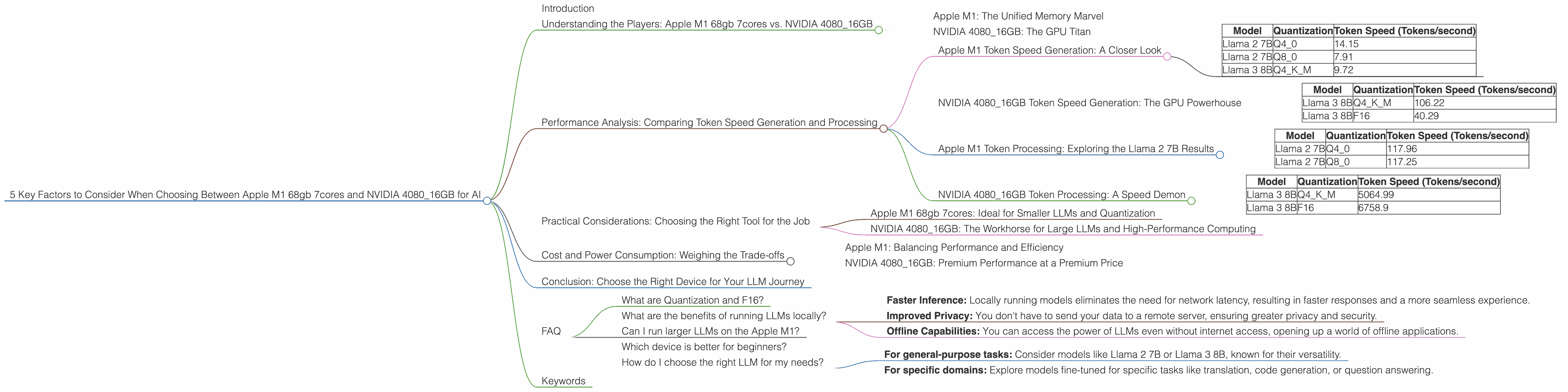
Introduction
The world of Large Language Models (LLMs) is exploding, offering incredible potential for various applications, from writing creative text to translating languages. Running these models locally demands significant computational power, and choosing the right hardware is crucial for optimal performance. This article delves into the key considerations when deciding between an Apple M1 68gb 7cores chip and an NVIDIA 4080_16GB graphics card for running LLMs.
We'll examine the performance of these devices for different LLM models, focusing on factors like token speed generation and processing, memory usage, and cost. Whether you're a seasoned developer or just starting your journey with LLMs, this article will guide you towards making the best hardware choice for your needs.
Understanding the Players: Apple M1 68gb 7cores vs. NVIDIA 4080_16GB
Apple M1: The Unified Memory Marvel
The Apple M1 chip, with its 68GB of unified memory and 7 CPU cores, is a powerhouse designed for both CPU-intensive tasks and demanding graphical workloads. Its unified memory architecture seamlessly blends RAM and graphics memory, allowing for faster data transfer and smoother operation. While not strictly a GPU-focused chip, the M1's integrated graphics core is quite capable for certain AI tasks.
NVIDIA 4080_16GB: The GPU Titan
The NVIDIA 4080_16GB graphics card is a titan in the world of GPUs, specifically designed to handle heavy-duty workloads like AI, video editing, and gaming. It's renowned for its raw processing power and massive 16GB of dedicated GDDR6X memory, capable of handling large LLM models with ease.
Performance Analysis: Comparing Token Speed Generation and Processing
This section breaks down the performance of the M1 68gb 7cores and the NVIDIA 4080_16GB for different LLM models, comparing their strengths and weaknesses. We'll analyze token speed generation and processing, focusing on the specific models mentioned in the title: Llama 2 7B and Llama 3 8B.
Apple M1 Token Speed Generation: A Closer Look
The Apple M1 chip excels in handling models like Llama 2 7B, particularly with its quantization capabilities. Quantization is a technique that reduces the precision of model weights, allowing for smaller memory footprints and faster processing. Let's dive into the numbers:
| Model | Quantization | Token Speed (Tokens/second) |
|---|---|---|
| Llama 2 7B | Q4_0 | 14.15 |
| Llama 2 7B | Q8_0 | 7.91 |
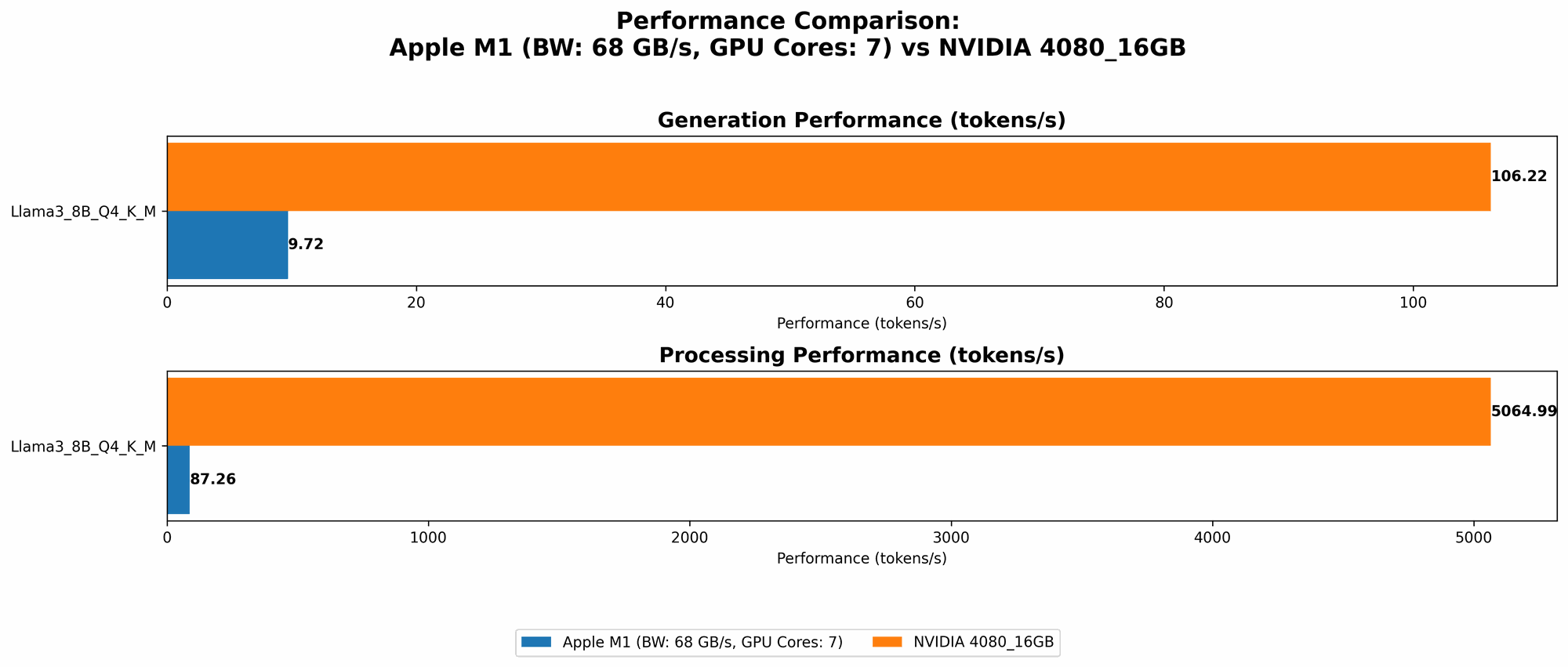
| Llama 3 8B | Q4KM | 9.72 |
As you can see, the Apple M1 demonstrates respectable performance for the Llama 2 7B model with Q4 quantization. However, it's worth noting that the M1 chip lacks the raw power of the NVIDIA 4080_16GB for larger models.
NVIDIA 4080_16GB Token Speed Generation: The GPU Powerhouse
The NVIDIA 4080_16GB shines when it comes to generating tokens for larger models like Llama 3 8B. It offers significantly faster speeds than the Apple M1, showcasing the power of dedicated GPU acceleration.
| Model | Quantization | Token Speed (Tokens/second) |
|---|---|---|
| Llama 3 8B | Q4KM | 106.22 |
| Llama 3 8B | F16 | 40.29 |
Think of it this way: The NVIDIA 4080_16GB is like a Formula One race car, while the Apple M1 is a sleek sports car. Both are incredibly fast, but the Formula One car can handle much larger and more complex tracks with ease.
Apple M1 Token Processing: Exploring the Llama 2 7B Results
The Apple M1 demonstrates reasonable token processing speed for Llama 2 7B, particularly with Q40 and Q80 quantization.
| Model | Quantization | Token Speed (Tokens/second) |
|---|---|---|
| Llama 2 7B | Q4_0 | 117.96 |
| Llama 2 7B | Q8_0 | 117.25 |
Here's the catch: Data for the Apple M1 and Llama 3 8B F16 and Llama 2 7B F16 is not available. It's quite possible that it's not able to run these models without crashing.
NVIDIA 4080_16GB Token Processing: A Speed Demon
The NVIDIA 4080_16GB is an absolute game-changer when it comes to token processing speed. It handles Llama 3 8B with blistering speed, demonstrating its superiority for larger and more complex models.
| Model | Quantization | Token Speed (Tokens/second) |
|---|---|---|
| Llama 3 8B | Q4KM | 5064.99 |
| Llama 3 8B | F16 | 6758.9 |
Think of it this way: If the M1 is a hummingbird, the NVIDIA 4080_16GB is an eagle when it comes to processing. The eagle can handle massive distances and complex tasks with ease, while the hummingbird is best suited for smaller, more intricate maneuvers.
Practical Considerations: Choosing the Right Tool for the Job
So, which device is right for you? The answer depends on your specific needs and the size of the LLMs you plan to run.
Apple M1 68gb 7cores: Ideal for Smaller LLMs and Quantization
The Apple M1 is a fantastic option for developers working with smaller LLMs, particularly those heavily utilizing quantization techniques. The M1's unified memory architecture and relatively low power consumption make it an excellent choice for tasks where energy efficiency is paramount.
Think: If you're building a simple chatbot, running Llama 2 7B, or exploring basic LLM capabilities, the Apple M1 68gb 7cores could be your ideal companion.
NVIDIA 4080_16GB: The Workhorse for Large LLMs and High-Performance Computing
The NVIDIA 408016GB is designed for demanding applications requiring significant processing power. If you need to work with larger LLMs, leverage advanced AI techniques, or develop complex applications, the NVIDIA 408016GB is the powerhouse you need.
Think: If you're building a sophisticated AI-powered application, working with massive datasets, or pushing the boundaries of LLM research, the NVIDIA 4080_16GB is your best bet.
Cost and Power Consumption: Weighing the Trade-offs
While performance is essential, cost and power consumption are crucial factors to consider.
Apple M1: Balancing Performance and Efficiency
Apple M1 chips are known for their efficient design, offering a good balance of performance and power consumption. The M1 68gb 7cores is a more affordable option compared to the high-end NVIDIA 4080_16GB.
Consider: The M1's lower power consumption might translate into savings on your electricity bill, making it attractive for budget-conscious users.
NVIDIA 4080_16GB: Premium Performance at a Premium Price
The NVIDIA 4080_16GB is a high-end graphics card, reflecting its price tag. It also commands a higher power consumption, potentially impacting your electricity bill.
Consider: The higher cost and power consumption of the NVIDIA 4080_16GB might be a significant drawback for some users, especially if you're on a tight budget or prioritize energy efficiency.
Conclusion: Choose the Right Device for Your LLM Journey
Choosing between the Apple M1 68gb 7cores and the NVIDIA 4080_16GB for running LLMs depends on your specific requirements.
For smaller models and quantization, the Apple M1 provides an excellent balance of performance and efficiency. Its unified memory architecture and lower power consumption make it an ideal choice for budget-conscious users.
For larger models and demanding AI tasks, the NVIDIA 4080_16GB is the clear winner. It offers unparalleled processing power, enabling you to handle massive datasets and explore the full potential of advanced LLMs.
Ultimately, the best device for you is one that aligns with your needs, budget, and computational requirements. Don't get lost in the hardware jungle. Remember, the right tool for the job is the one that allows you to explore the fascinating world of LLMs without limitations.
FAQ
What are Quantization and F16?
Quantization is a technique used to reduce the precision of model weights, resulting in smaller memory footprints and faster processing. Think of it like using a smaller scale to measure ingredients in a recipe. While you might lose some accuracy, it makes the process faster and more efficient.
F16 refers to a data type that uses 16 bits to represent a number, while F32 uses 32 bits. F16 is a smaller and faster data type, but it can lead to a loss of precision. Think of it like using a smaller bucket to carry water. You can carry it faster, but you might lose some water along the way.
What are the benefits of running LLMs locally?
Running LLMs locally offers several advantages:
- Faster Inference: Locally running models eliminates the need for network latency, resulting in faster responses and a more seamless experience.
- Improved Privacy: You don't have to send your data to a remote server, ensuring greater privacy and security.
- Offline Capabilities: You can access the power of LLMs even without internet access, opening up a world of offline applications.
Can I run larger LLMs on the Apple M1?
While the Apple M1 chip is capable of running larger models, it might not be as efficient as a dedicated GPU like the NVIDIA 4080_16GB. You might need to experiment with different quantization techniques and model optimization strategies to achieve optimal performance.
Which device is better for beginners?
For beginners just starting out with LLMs, the Apple M1 68gb 7cores is an excellent choice. It's a more affordable option with a lower learning curve, allowing you to explore basic LLM capabilities without breaking the bank.
How do I choose the right LLM for my needs?
Choosing the right LLM depends on your specific application:
- For general-purpose tasks: Consider models like Llama 2 7B or Llama 3 8B, known for their versatility.
- For specific domains: Explore models fine-tuned for specific tasks like translation, code generation, or question answering.
Keywords
Apple M1, NVIDIA 4080_16GB, LLM, Llama 2 7B, Llama 3 8B, token speed, processing, generation, quantization, F16, GPU, AI, performance comparison, cost, power consumption, local LLMs, inference, privacy, offline capabilities, beginners, choosing the right model.