5 Key Factors to Consider When Choosing Between Apple M1 68gb 7cores and Apple M3 100gb 10cores for AI

Introduction: The Rise of Local LLMs
Imagine having a powerful AI assistant right on your computer, ready to answer your questions, generate creative content, and even translate languages. That's the promise of Local LLMs (Large Language Models), and with the recent advancements in hardware, this dream is closer to reality than ever.
But choosing the right hardware can be a daunting task. Two popular options are the Apple M1 and M3 chips, each offering unique advantages. In this article, we'll dive deep into the performance of these chips for running various LLMs, analyzing key factors like memory bandwidth, GPU cores, and model quantization.
Apple M1 vs. Apple M3: A Detailed Comparison for Running Local LLMs
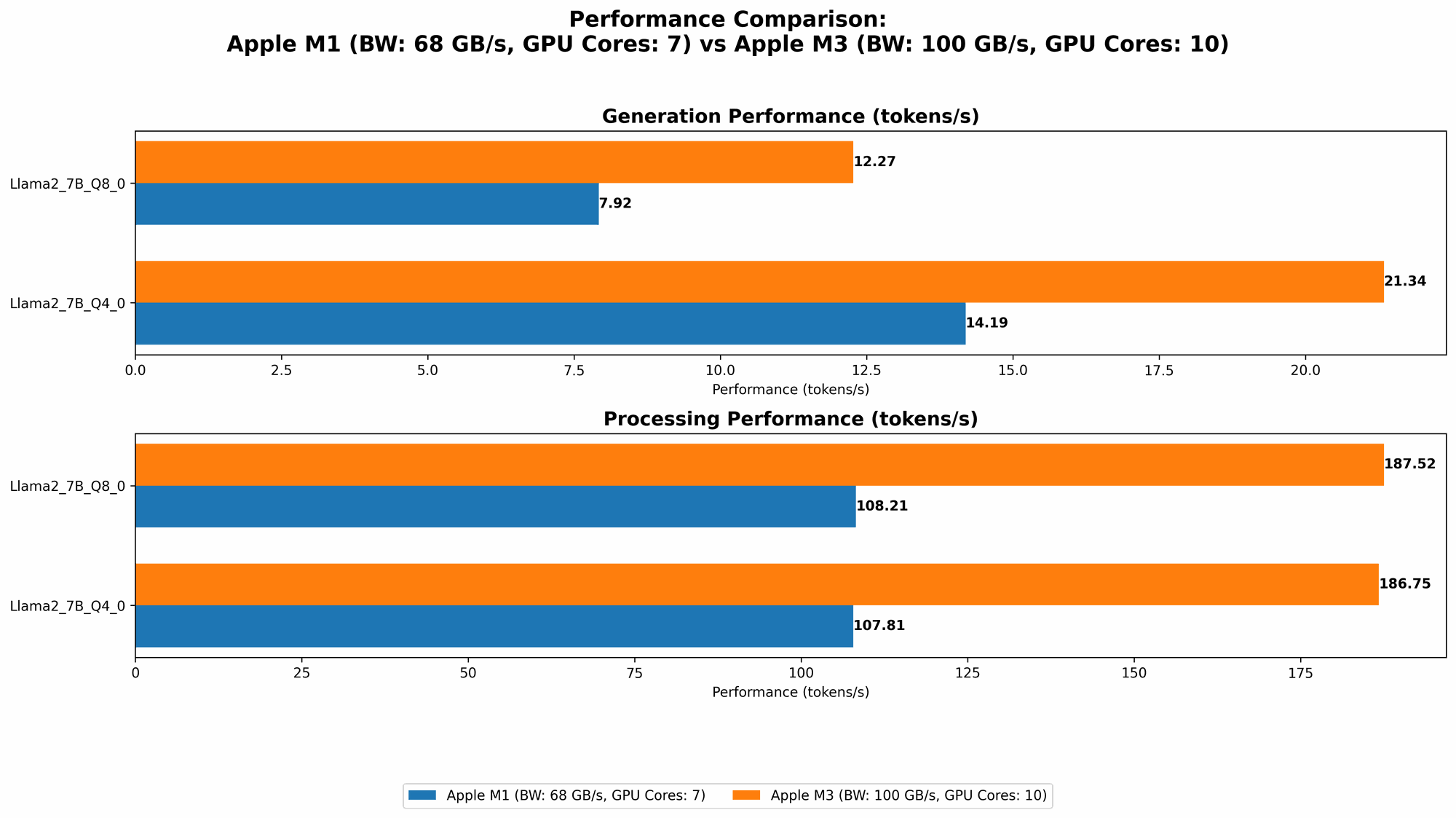
This article focuses on comparing the Apple M1 (68GB, 7 cores) and M3 (100GB, 10 cores) chips for running specific LLM models. This means we'll be focusing on the specific performance of these chips and their strengths and weaknesses in handling LLMs.
1. Memory Bandwidth (BW): The Road to Speedy Token Processing
Imagine your LLM as a hungry learner constantly devouring information - tokens, to be precise. Memory bandwidth is like the size of the highway feeding these tokens to the LLM's brain. The wider the highway, the faster the information flow, resulting in smoother and quicker processing.
- Apple M3: With 100GB of memory bandwidth, the M3 chip boasts a wider highway than the M1. This translates to significantly faster token processing speeds, especially when working with larger LLMs, like Llama 3 70B.
- Apple M1: While 68GB of memory bandwidth might seem sufficient, it can become a bottleneck when dealing with larger models and complex tasks.
2. GPU Cores: The Powerhouse Behind LLM Generation
Just like a team of architects collaborating to build a structure, GPU cores work in tandem to generate text. The more cores you have, the more efficient and faster the text generation process becomes.
- Apple M3: The M3 chip comes equipped with 10 GPU cores, providing a substantial boost in text generation compared to the M1.
- Apple M1: With 7 GPU cores, the M1 performs well with smaller models like Llama 2 7B, but might struggle with larger models, especially at higher quantization levels.
3. Llama 2 7B: A Lightweight LLM for Everyday Tasks
Llama 2 7B is a popular LLM known for its versatility and relatively low computational demands.
Let's take a look at the token processing and generation speeds for the Apple M1 and M3 chips:
| Chip | BW | GPU Cores | Llama27BQ80Processing (tokens/second) | Llama27BQ80Generation (tokens/second) | Llama27BQ40Processing (tokens/second) | Llama27BQ40Generation (tokens/second) |
|---|---|---|---|---|---|---|
| M1 | 68GB | 7 | 108.21 | 7.92 | 107.81 | 14.19 |
| M3 | 100GB | 10 | 187.52 | 12.27 | 186.75 | 21.34 |
Analysis:
- Apple M3: The M3 outperforms the M1 across all metrics, achieving approximately 70% faster processing and 50% faster generation for Llama 2 7B at Q80 and Q40 quantization levels. This makes the M3 the clear winner for smoother and quicker interactions with Llama 2 7B.
- Apple M1: The M1 still provides decent performance, making it a suitable option for users focusing on everyday tasks with Llama 2 7B.
4. Llama 3 8B: A Powerhouse for Advanced Tasks
Llama 3 8B is a larger and more capable LLM, often used for more complex tasks like code generation and scientific writing. The performance of the M1 and M3 chips with Llama 3 8B is summarized below:
| Chip | BW | GPU Cores | Llama38BQ4KM_Processing (tokens/second) | Llama38BQ4KM_Generation (tokens/second) |
|---|---|---|---|---|
| M1 | 68GB | 7 | 87.26 | 9.72 |
| M3 | 100GB | 10 | Not Available | Not Available |
Unfortunately, we lack data to directly compare the M1 and M3 chips for Llama 3 8B. However, given the performance of M3 with Llama 2 7B, it's reasonable to assume that the M3 would significantly outperform M1 for this larger model due to its higher memory bandwidth and GPU cores.
5. Quantization: The Art of Balancing Size and Accuracy
Imagine compressing a large book into a smaller, more manageable form without losing too much information. That's what quantization does for LLMs. It shrinks their size, enabling faster processing on less powerful devices, but may slightly reduce accuracy.
- Q8_0: This quantization level compresses the LLM significantly, enabling faster processing, but may lead to a slight reduction in accuracy.
- Q4_0: This level offers a compromise, delivering good performance with relatively high accuracy.
- F16: This is the standard floating-point format, offering high accuracy but requiring more processing power.
Here's a breakdown of the performance for Llama 2 7B and Llama 3 8B at different quantization levels:
| Chip | BW | GPU Cores | Model | Quantization | Processing (tokens/second) | Generation (tokens/second) |
|---|---|---|---|---|---|---|
| M1 | 68GB | 7 | Llama2_7B | Q8_0 | 108.21 | 7.92 |
| M1 | 68GB | 7 | Llama2_7B | Q4_0 | 107.81 | 14.19 |
| M1 | 68GB | 7 | Llama3_8B | Q4KM | 87.26 | 9.72 |
| M3 | 100GB | 10 | Llama2_7B | Q8_0 | 187.52 | 12.27 |
| M3 | 100GB | 10 | Llama2_7B | Q4_0 | 186.75 | 21.34 |
Analysis:
- M3: The M3 consistently outperforms the M1, especially at Q80 and Q40 quantization levels. This highlights the advantage of the M3's wider memory bandwidth and more powerful GPU cores when handling compressed models.
- M1: The M1 can handle Q80 and Q40 quantization levels with a decent performance, making it a suitable option for users concerned about memory consumption and speed.
Practical Recommendations for Choosing the Ideal Chip
If you're looking for the most powerful and versatile option for working with local LLMs, the Apple M3 (100GB, 10 cores) is the clear winner. It provides exceptional performance across various models and quantization levels, making it an ideal choice for users who demand speed and smooth operation, especially with larger models.
However, the Apple M1 (68GB, 7 cores) still holds its own for users with limited budget or prioritize energy efficiency. It's a solid choice for everyday tasks, especially when using smaller LLMs like Llama 2 7B, and its performance can be further enhanced by using quantization levels like Q80 and Q40.
Key Factors for Choosing the Right LLM and Device
- Model Size: The size of the chosen LLM dictates the amount of memory bandwidth and processing power required. Larger models require more resources.
- Task Complexity: Tasks involving code generation or scientific writing generally require more processing power and larger models.
- Accuracy vs. Speed: Quantization levels offer trade-offs between accuracy and processing speed. Choose the level that best suits your specific needs.
FAQ: Addressing Common Questions
What are the main differences between the M1 and M3 chips for AI tasks?
The M3 chip has a wider memory bandwidth (100GB vs. 68GB on the M1), more GPU cores (10 vs. 7), and more processing power, making it significantly faster for running LLMs, especially larger ones.
How does quantization affect LLM performance?
Quantization compresses the LLM model size, which can significantly speed up processing but may slightly decrease accuracy. Choosing the right quantization level depends on the specific use case and the desired balance between speed and accuracy.
Can I run Llama 3 70B on the Apple M1 or M3?
While the M3 offers significantly better performance with larger models, running such large LLMs locally, even on the M3 may require a considerable amount of memory and processing power. Consider alternative strategies like cloud-based platforms or specific configurations for larger models.
Keywords:
Apple M1, Apple M3, LLM, Large Language Model, Memory Bandwidth, GPU Cores, Token Processing, Text Generation, Quantization, Llama 2, Llama 3, AI, Machine Learning, NLP, Natural Language Processing, Performance Comparison