5 Key Factors to Consider When Choosing Between Apple M1 68gb 7cores and Apple M2 Pro 200gb 16cores for AI
Introduction: Bridging the Gap Between Local LLM Power and Hardware Choices
The world of Large Language Models (LLMs) is exploding, but running these models locally can be a challenge. You'll need a powerful machine to handle the heavy processing involved. This is where Apple's M1 and M2 Pro chips come in, but how do you choose the right one for your AI projects?
This article dives deep into the capabilities of the Apple M1 68GB 7-core and Apple M2 Pro 200GB 16-core chips when running LLMs like Llama 2 and Llama 3. We'll examine key factors like token speed, memory capacity, and overall performance, empowering you to make the best decision for your specific needs.
Apple M1 Token Speed Generation: A Look at Processing and Generation Rates
Let's start with the heart of LLM performance: token speed. Tokens represent the units of text processed and generated by an LLM, so faster token speeds mean your AI applications respond quicker.
Comparing Apple M1 and Apple M2 Pro for Llama 2 Model
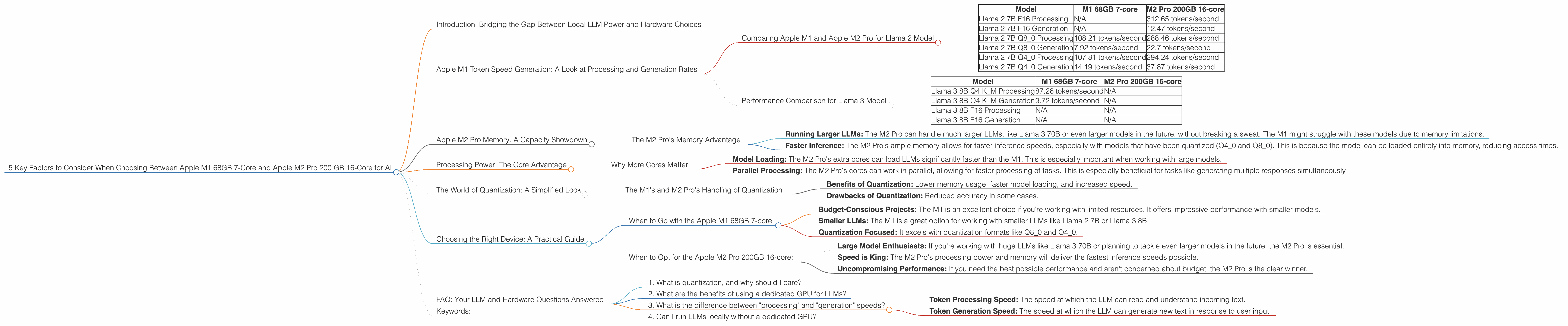
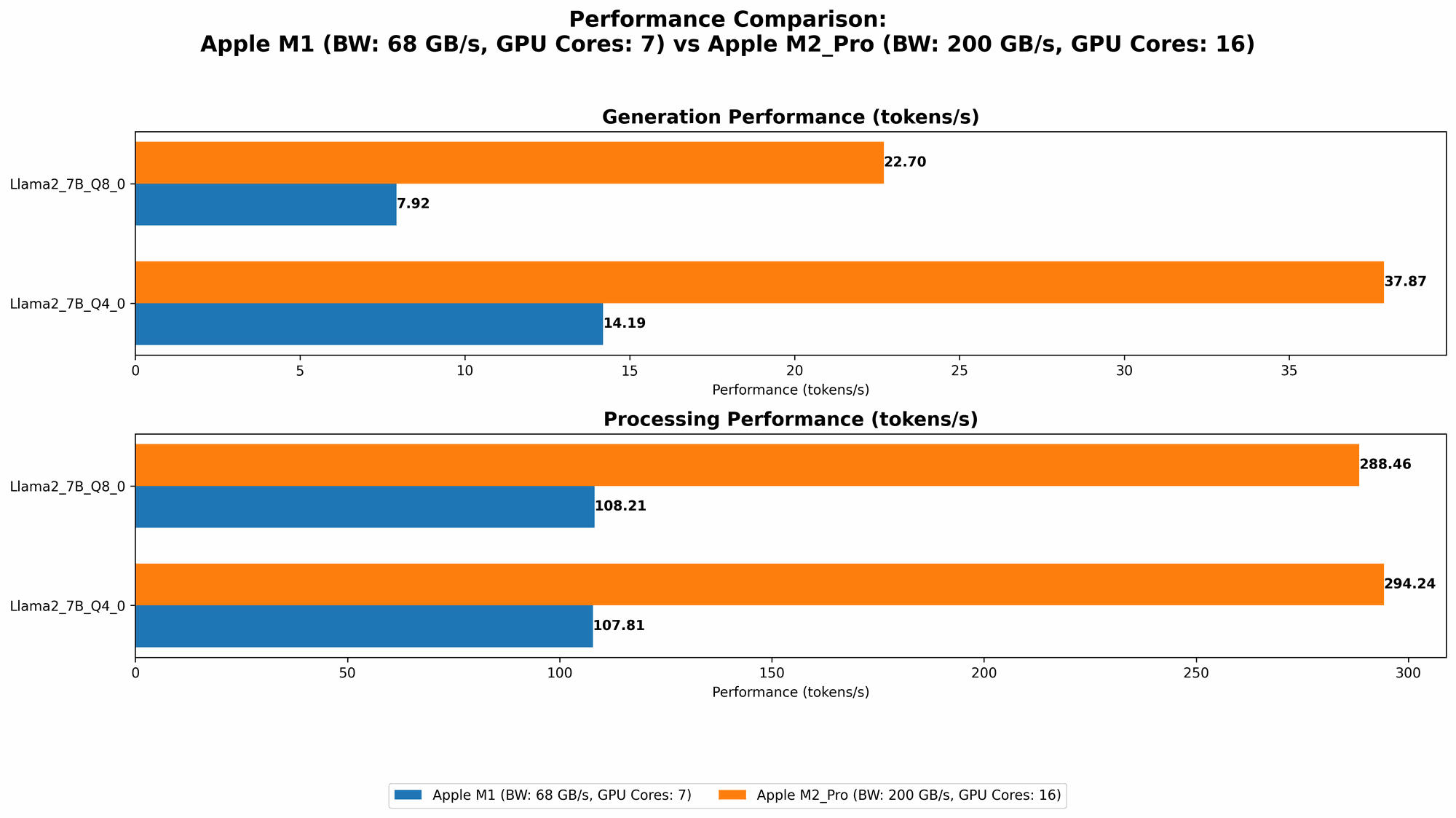
The Apple M1 68GB 7-core and Apple M2 Pro 200GB 16-core chips both have impressive token speeds when running Llama 2 models. However, the M2 Pro clearly takes the lead, especially for higher precision formats:
| Model | M1 68GB 7-core | M2 Pro 200GB 16-core |
|---|---|---|
| Llama 2 7B F16 Processing | N/A | 312.65 tokens/second |
| Llama 2 7B F16 Generation | N/A | 12.47 tokens/second |
| Llama 2 7B Q8_0 Processing | 108.21 tokens/second | 288.46 tokens/second |
| Llama 2 7B Q8_0 Generation | 7.92 tokens/second | 22.7 tokens/second |
| Llama 2 7B Q4_0 Processing | 107.81 tokens/second | 294.24 tokens/second |
| Llama 2 7B Q4_0 Generation | 14.19 tokens/second | 37.87 tokens/second |
Key Observations:
- The M2 Pro significantly outperforms the M1 for both processing and generation speeds in F16 format. This difference is even more pronounced in the Q40 and Q80 quantization formats.
- The M1 68GB 7-core performs well in Q80 and Q40 formats. The M1 68GB 7-core still provides decent performance in Q80 and Q40, which are often used to reduce memory consumption and increase speed.
Think of it like this: Imagine you're running a race against a friend. The M2 Pro is the Usain Bolt of LLMs, zipping through tokens with speed and efficiency. The M1 is still a fast runner, but the M2 Pro clearly pulls ahead.
Performance Comparison for Llama 3 Model
Let's shift our focus to Llama 3, another popular open-source LLM. Here's a breakdown of the performance on the M1 and M2 Pro, focusing on Llama 3 8B, as data for Llama 3 70B is currently unavailable.
| Model | M1 68GB 7-core | M2 Pro 200GB 16-core |
|---|---|---|
| Llama 3 8B Q4 K_M Processing | 87.26 tokens/second | N/A |
| Llama 3 8B Q4 K_M Generation | 9.72 tokens/second | N/A |
| Llama 3 8B F16 Processing | N/A | N/A |
| Llama 3 8B F16 Generation | N/A | N/A |
Key Observations:
- The M1 68GB 7-core shows strong performance with Llama 3 8B in Q4 K_M format.
- We need more data for the M2 Pro performance with Llama 3 models. The lack of data for Llama 3 8B and Llama 3 70B on the M2 Pro means we can't make direct comparisons for those specific models.
- We can infer that the M2 Pro will likely outperform the M1 with Llama 3 models. This assumption is based on the M2 Pro's superior performance with Llama 2 models.
Apple M2 Pro Memory: A Capacity Showdown
Memory is crucial when running LLMs. Larger models require more memory, and those models that have been quantized (like Q80 and Q40) can benefit from a memory boost. This is where the M2 Pro 200GB 16-core comes into its own.
The M2 Pro's Memory Advantage
The M2 Pro boasts a massive 200GB of memory, while the M1 68GB 7-core chip offers a respectable 68GB. This difference has a significant impact:
- Running Larger LLMs: The M2 Pro can handle much larger LLMs, like Llama 3 70B or even larger models in the future, without breaking a sweat. The M1 might struggle with these models due to memory limitations.
- Faster Inference: The M2 Pro's ample memory allows for faster inference speeds, especially with models that have been quantized (Q40 and Q80). This is because the model can be loaded entirely into memory, reducing access times.
Think of it like this: Having more memory is like having a bigger desk. The M1 is a comfortable desk, but the M2 Pro is a huge warehouse!
Processing Power: The Core Advantage
The M2 Pro 200GB 16-core comes packed with 16 GPU cores and a 12-core CPU. While the M1 68GB 7-core has 7 GPU cores and a 8-core CPU, it's the raw processing power that separates these two chips.
Why More Cores Matter
More cores mean more processing power. This translates to faster model loading, faster token generation, and the ability to handle more complex tasks:
- Model Loading: The M2 Pro's extra cores can load LLMs significantly faster than the M1. This is especially important when working with large models.
- Parallel Processing: The M2 Pro's cores can work in parallel, allowing for faster processing of tasks. This is especially beneficial for tasks like generating multiple responses simultaneously.
Think of it like this: Imagine building a Lego set. The M1 might be a good builder, but the M2 Pro is a team of Lego masters working together to get the task done quicker.
The World of Quantization: A Simplified Look
Quantization is a smart trick used to shrink the size of LLMs without sacrificing much accuracy. Imagine compressing an image file. It makes the file size smaller without losing much detail.
The M1's and M2 Pro's Handling of Quantization
Quantization formats like Q80 and Q40 can significantly reduce the memory footprint of your LLM, allowing for smaller models and faster inference.
- Benefits of Quantization: Lower memory usage, faster model loading, and increased speed.
- Drawbacks of Quantization: Reduced accuracy in some cases.
Both the M1 and the M2 Pro work well with quantization.
The M2 Pro's added memory and processing power helps it shine with quantization. It can handle models that have been quantized to Q80 and Q40, significantly improving their performance.
Choosing the Right Device: A Practical Guide
Now, let's put it all together and help you choose the right device for your AI projects:
When to Go with the Apple M1 68GB 7-core:
- Budget-Conscious Projects: The M1 is an excellent choice if you're working with limited resources. It offers impressive performance with smaller models.
- Smaller LLMs: The M1 is a great option for working with smaller LLMs like Llama 2 7B or Llama 3 8B.
- Quantization Focused: It excels with quantization formats like Q80 and Q40.
When to Opt for the Apple M2 Pro 200GB 16-core:
- Large Model Enthusiasts: If you're working with huge LLMs like Llama 3 70B or planning to tackle even larger models in the future, the M2 Pro is essential.
- Speed is King: The M2 Pro's processing power and memory will deliver the fastest inference speeds possible.
- Uncompromising Performance: If you need the best possible performance and aren't concerned about budget, the M2 Pro is the clear winner.
FAQ: Your LLM and Hardware Questions Answered
1. What is quantization, and why should I care?
Quantization is a process that reduces the size of LLMs by using fewer bits to represent the numbers that the model uses. This makes the models smaller and faster, but it can slightly reduce accuracy.
2. What are the benefits of using a dedicated GPU for LLMs?
GPUs excel at parallel processing, which is essential for the heavy computations involved in LLMs. They offer significantly faster token speed and overall inference performance compared to CPUs.
3. What is the difference between "processing" and "generation" speeds?
- Token Processing Speed: The speed at which the LLM can read and understand incoming text.
- Token Generation Speed: The speed at which the LLM can generate new text in response to user input.
4. Can I run LLMs locally without a dedicated GPU?
Yes, you can run LLMs locally on a CPU, but the performance will be much slower. A GPU is recommended for a smooth and efficient experience.
Keywords:
Apple M1, Apple M2 Pro, LLM, Llama 2, Llama 3, Token Speed, Quantization, GPU, AI, Machine Learning, Deep Learning, Model Inference, Local LLMs