5 Cost Saving Strategies When Building an AI Lab with NVIDIA 4090 24GB

Introduction
Building an AI lab is an exciting endeavor, but it can also be expensive. One of the most significant expenses is the hardware, especially when working with large language models (LLMs) that require high-performance GPUs. The NVIDIA 4090_24GB is a powerful choice, but it's not cheap. By implementing smart strategies, you can save money without sacrificing performance.
This article guides you through five key cost-saving strategies when building an AI lab with the NVIDIA 4090_24GB, focusing on optimization techniques and utilizing data to make informed decisions. We'll explore different approaches, delve into the performance implications, and uncover how to maximize your investment.
Strategy 1: Leveraging Quantization for Model Compression
Quantization is like a language translator for your AI model. Imagine trying to learn a language with a massive, thick dictionary - daunting, right? Quantization takes your bulky model and "translates" it into a smaller, leaner version without sacrificing much accuracy. Think of it as replacing those heavy dictionaries with a handy phrasebook for frequent conversations.
How Quantization Saves Money
Here's the magic of quantization:
- Reduced Memory Footprint: Imagine storing a large language model as a bulky book. Quantization shrinks the book to a more manageable size, reducing memory requirements and allowing you to fit more models on the same device. This is like switching from a huge bookshelf to a compact e-reader.
- Faster Inference Speeds: Smaller models are like faster runners - they zip through processing tasks quicker. This translates into faster inference times and more efficient use of your GPU.
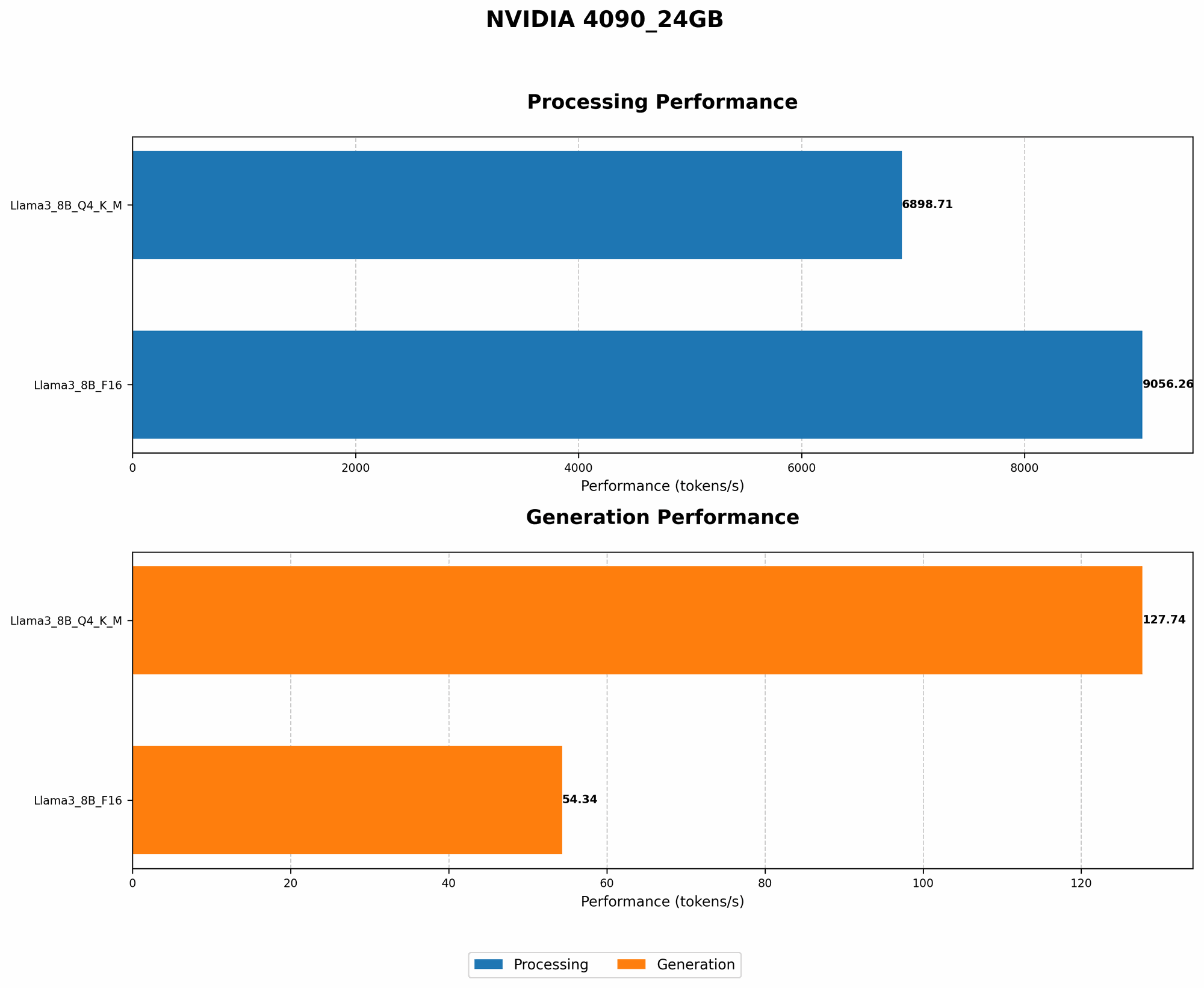
Example: Using a Llama 3 8B model with 4-bit quantization, you can achieve a significant boost in speed compared to the F16 format.
| Model | Quantization | Tokens/Second (Generation) | Tokens/Second (Processing) |
|---|---|---|---|
| Llama 3 8B | Q4_K_M | 127.74 | 6898.71 |
| Llama 3 8B | F16 | 54.34 | 9056.26 |
As the data shows, the Q4_K_M quantization significantly outperforms the F16 format in terms of token generation speed, while maintaining similar performance in processing.
Strategy 2: Choosing the Right LLM Model for Your Needs
Let's face it, not all LLMs are created equal. Just like choosing the right tool for the job, selecting the appropriate LLM for your specific needs can have a significant impact on your budget.
Finding the Right LLM
Here's a breakdown of the key factors to consider:
- Model Size: Larger models often boast impressive capabilities, but they also demand more computational resources. Think of it like a car - larger models are like SUVs, requiring more fuel, while smaller models resemble fuel-efficient hatchbacks.
- Task Complexity: Complex tasks like generating detailed summaries or writing creative content may require larger models. Simpler tasks, such as answering basic questions, could be handled by a smaller, more cost-effective model.
- Performance Requirements: If fast inference is a priority, consider smaller models or explore quantization techniques.
Important Note: Data for Llama 3 70B models is unavailable due to limitations in the data source.
Strategy 3: Harnessing Multi-GPU Processing

Imagine having multiple chefs in your kitchen, each tackling a specific task - that's the idea behind multi-GPU processing. Instead of trying to handle everything on a single GPU, you can distribute the workload across multiple GPUs, accelerating the process.
Multi-GPU Benefits
- Increased Throughput: By harnessing the power of multiple GPUs, you achieve significant speedups, allowing you to handle more data and complete tasks faster.
- Parallel Processing: Each GPU works independently, handling different parts of your workload concurrently, leading to substantial gains in processing time.
Example: For specific tasks like generating large amounts of text, multiple NVIDIA 4090_24GB GPUs working in parallel can significantly reduce processing time and improve overall efficiency.
Strategy 4: Cloud-Based Inference for Scalability and Flexibility
Not every task requires you to build a dedicated AI lab. For smaller projects or occasional use cases, cloud-based inference offers a cost-effective alternative. Imagine having access to a "supercomputer" on demand, without the hefty hardware investment.
Cloud-Based Inference Advantages
- Scalability: Easily scale your resource usage based on your needs, effortlessly accommodating fluctuations in workload.
- Flexibility: Access various LLM models and configurations without needing to manage them locally, empowering you to experiment and explore different options.
- Cost-Effectiveness: Pay only for the resources you consume, making it ideal for short-term projects or scenarios where resource requirements are sporadic.
Important Note: Cloud-based inference solutions may come with their own pricing models, so it's important to compare different options and choose a suitable provider.
Strategy 5: Optimizing Code and Libraries for Performance
Just like a well-tuned engine, optimized code can significantly improve the efficiency of your LLM. Think of code optimization as fine-tuning your AI lab for maximum performance.
Code Optimization Tips
- Choosing the Right Libraries: Opt for libraries specifically designed for high-performance computation, like the highly regarded PyTorch, which is known for its efficiency and flexibility.
- Profiling and Analysis: Identify bottlenecks in your code, those areas that are slowing down the process, and implement targeted optimizations to streamline performance.
- Memory Management: Efficient memory management is crucial for efficient GPU utilization. Avoid unnecessary data copies and ensure optimal memory allocation to minimize memory leaks.
FAQ
1. What are some popular LLM models that work well with the NVIDIA 4090_24GB?
The NVIDIA 4090_24GB is capable of handling a wide range of LLM models, including:
- Llama 3 8B: A popular choice for its balance of performance and size.
- Llama 3 70B: A larger model suitable for more complex tasks, but may require more resources.
- GPT-Neo 2.7B: A model known for its impressive language generation capabilities.
- GPT-J-6B: A robust model for a variety of language tasks, though it may require a bit more computing power.
2. How much does it cost to run these models on the NVIDIA 4090_24GB?
The cost of running LLM models on the NVIDIA 4090_24GB depends on several factors:
- Model Size: Larger models like Llama 3 70B will consume more resources and potentially lead to higher electricity bills.
- Inference Frequency: Frequent inference sessions will result in higher energy consumption.
- Quantization and Optimization: Techniques like quantization and code optimizations can significantly reduce energy consumption and cost.
It's generally advisable to analyze your specific usage patterns and model requirements to estimate the running costs.
3. Is it worth investing in a high-end GPU like the NVIDIA 4090_24GB?
The NVIDIA 4090_24GB is a powerful GPU that offers significant advantages for LLM inference, but it's not the only option. The most suitable choice ultimately depends on your specific needs and budget.
If you primarily work with smaller LLM models or require infrequent inference sessions, a lower-end GPU might be sufficient. However, if you're dealing with large models, complex tasks, and frequent inference, the NVIDIA 4090_24GB provides a more efficient and powerful solution.
Keywords
NVIDIA 4090_24GB, AI lab, cost-saving strategies, quantization, LLM, model compression, multi-GPU, cloud-based inference, code optimization, Llama 3 8B, Llama 3 70B, GPT-Neo 2.7B, GPT-J-6B, performance, efficiency, budget, PyTorch, inference speed, memory footprint, processing time, scalability, flexibility, cost-effectiveness.