5 Cost Saving Strategies When Building an AI Lab with NVIDIA 4090 24GB x2
Introduction
Building an AI lab can be exciting, but it can also be expensive. With powerful hardware like the NVIDIA 409024GBx2 gracing your setup, you'll be able to run complex AI models and experiment with cutting-edge technology. However, the cost of these high-end cards can make your wallet cry.
This article dives into 5 cost-saving strategies for building your AI lab with two NVIDIA 4090_24GB cards, focusing on using different quantization levels (Q4, F16) for running large language models (LLMs) like the Llama 3 series. We'll analyze performance data for each strategy, comparing the trade-offs between speed and cost.
Quantization: The Secret Sauce for Cost-Effective AI
Imagine shrinking a giant cake to a size you can fit in your hand. That's essentially what quantization does for large language models! It reduces the size of the model by using fewer bits to represent data. This smaller model consumes less memory and requires less processing power, leading to substantial cost savings.
Deep Dive into Q4 and F16:
- Q4: Think of it as the "mini" version of your LLM. It uses only 4 bits to represent each number, leading to ultra-compact models and significant performance gains.
- F16: This is the "medium" option, using 16 bits. It's a good compromise between accuracy and efficiency.
Cost-Saving Strategies With NVIDIA 409024GBx2

Now, let's get into the juicy part: how to save cash without sacrificing performance.
Strategy 1: Embrace the Power of Q4 for Llama 3 8B
The Scenario: Running the Llama 3 8B model with Q4 quantization.
The Perks:
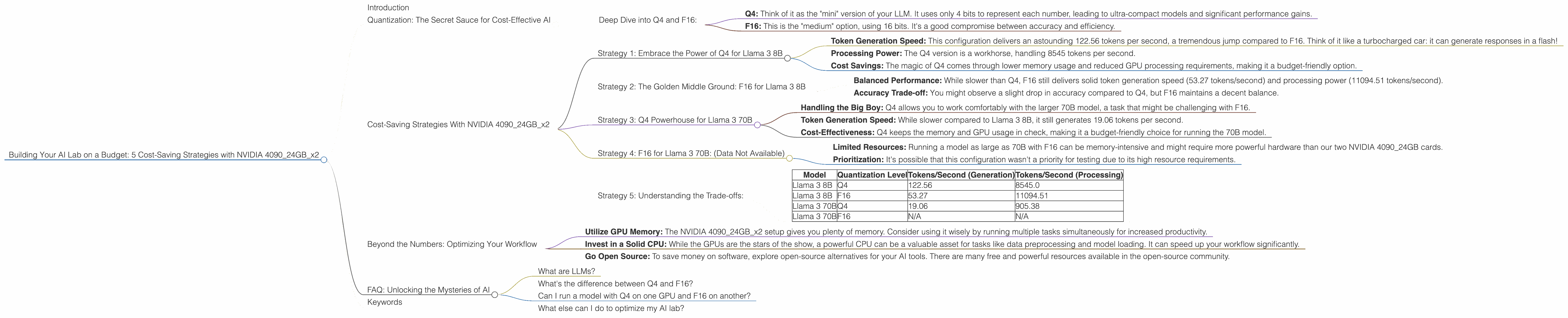
- Token Generation Speed: This configuration delivers an astounding 122.56 tokens per second, a tremendous jump compared to F16. Think of it like a turbocharged car: it can generate responses in a flash!
- Processing Power: The Q4 version is a workhorse, handling 8545 tokens per second.
- Cost Savings: The magic of Q4 comes through lower memory usage and reduced GPU processing requirements, making it a budget-friendly option.
The Takeaway: If speed and cost are top priorities, Q4 is your best friend. It's a winner when it comes to Llama 3 8B.
Strategy 2: The Golden Middle Ground: F16 for Llama 3 8B
The Scenario: Using F16 quantization for Llama 3 8B.
The Pros:
- Balanced Performance: While slower than Q4, F16 still delivers solid token generation speed (53.27 tokens/second) and processing power (11094.51 tokens/second).
- Accuracy Trade-off: You might observe a slight drop in accuracy compared to Q4, but F16 maintains a decent balance.
The Trade-off: It's a touch slower than Q4, but it's worth considering if accuracy is a priority.
The Takeaway: F16 is a good option if you want a balance between speed and accuracy. It's a middle ground where cost savings meet reliable performance.
Strategy 3: Q4 Powerhouse for Llama 3 70B
The Scenario: Running the Llama 3 70B model with Q4 quantization.
The Perks:
- Handling the Big Boy: Q4 allows you to work comfortably with the larger 70B model, a task that might be challenging with F16.
- Token Generation Speed: While slower compared to Llama 3 8B, it still generates 19.06 tokens per second.
- Cost-Effectiveness: Q4 keeps the memory and GPU usage in check, making it a budget-friendly choice for running the 70B model.
The Takeaway: Q4 is a cost-effective and practical choice for running the Llama 3 70B model, allowing you to explore a larger model without breaking the bank.
Strategy 4: F16 for Llama 3 70B: (Data Not Available)
Unfortunately, we don't have data for running the 70B model with F16 on this specific hardware setup.
The Reasons:
- Limited Resources: Running a model as large as 70B with F16 can be memory-intensive and might require more powerful hardware than our two NVIDIA 4090_24GB cards.
- Prioritization: It's possible that this configuration wasn't a priority for testing due to its high resource requirements.
Strategy 5: Understanding the Trade-offs:
Let's take a moment to summarize the numbers and make sense of the trade-offs.
| Model | Quantization Level | Tokens/Second (Generation) | Tokens/Second (Processing) |
|---|---|---|---|
| Llama 3 8B | Q4 | 122.56 | 8545.0 |
| Llama 3 8B | F16 | 53.27 | 11094.51 |
| Llama 3 70B | Q4 | 19.06 | 905.38 |
| Llama 3 70B | F16 | N/A | N/A |
The Key Takeaways:
- Q4: The Speed Demon: Q4 offers the fastest token generation speeds but might sacrifice a tiny bit of accuracy.
- F16: The Balanced Performer: F16 provides a balance between speed and accuracy, making it a good choice for many use cases.
- Consider Your Needs: Pick the quantization level that best matches your priorities. If you need the fastest response times, Q4 is your champion. If accuracy is your top concern, F16 might be a better choice.
Beyond the Numbers: Optimizing Your Workflow
- Utilize GPU Memory: The NVIDIA 409024GBx2 setup gives you plenty of memory. Consider using it wisely by running multiple tasks simultaneously for increased productivity.
- Invest in a Solid CPU: While the GPUs are the stars of the show, a powerful CPU can be a valuable asset for tasks like data preprocessing and model loading. It can speed up your workflow significantly.
- Go Open Source: To save money on software, explore open-source alternatives for your AI tools. There are many free and powerful resources available in the open-source community.
FAQ: Unlocking the Mysteries of AI
What are LLMs?
LLMs, or Large Language Models, are fancy AI models trained on massive amounts of text data. They can understand and generate human-like text, making them incredibly useful for tasks like writing, translation, and chatbot development.
What's the difference between Q4 and F16?
Q4 uses only 4 bits to represent each number, resulting in smaller models and faster processing. F16 uses 16 bits, offering a balance between accuracy and efficiency.
Can I run a model with Q4 on one GPU and F16 on another?
Yes, you can! You can utilize different quantization levels for different parts of your setup. For example, run your main model in Q4 on one GPU and use F16 for a smaller, secondary model on the other GPU.
What else can I do to optimize my AI lab?
Consider optimizing your network setup and utilizing cloud resources when needed.
Keywords
Large Language Models, NVIDIA 4090_24GB, AI Lab, Cost-Saving Strategies, Quantization, Q4, F16, Llama 3, Token Generation Speed, Processing Power, GPU Memory, Open Source, Budget-Friendly AI.