5 Cost Saving Strategies When Building an AI Lab with NVIDIA 3090 24GB

Introduction
The world of large language models (LLMs) is evolving rapidly, and building your own AI lab has become more accessible than ever. However, the costs associated with powerful hardware can be a significant barrier to entry. This article explores five cost-saving strategies for building a powerful AI lab with an NVIDIA 3090_24GB, focusing on ways to maximize the potential of this graphics card while minimizing expenses. We’ll cover strategies that benefit both experienced developers and beginners, making the journey to AI development more affordable and enjoyable.
Understanding the NVIDIA 3090_24GB's Power
The NVIDIA 3090_24GB is a powerhouse for AI tasks, boasting 24 gigabytes of memory and a staggering amount of processing power. But even with this kind of horsepower, achieving optimal results requires careful planning and optimization. For example, you might be tempted to run a massive 70B parameter LLM, but if your model frequently crashes, you might be better off choosing a smaller but more efficient model, like a 7B or 8B parameter LLM. It's all about finding that delicate balance between ambitious goals and realistic execution.
Strategy 1: Quantization for Increased Efficiency

Quantization is a powerful technique for reducing the size of your neural network models without sacrificing much accuracy. Think of it like shrinking a high-resolution image – you lose some detail but gain a much more manageable file size. This reduced size translates to faster processing and less memory consumption, making it a valuable tool for cost-saving.
How Quantization Helps
- Boosts Memory Efficiency: By reducing the size of your model, quantization frees up valuable memory, allowing you to accommodate larger models or run more tasks simultaneously.
- Enhances Processing Speed: With a lighter model, the GPU can process information more efficiently, leading to faster inference times and overall greater productivity. Imagine your computer doing those complex AI calculations like a speeding bullet!
- Reduces Storage Costs: Quantized models take up less storage space, leading to cost savings on storage infrastructure and data management. It's like having more room in your hard drive without actually buying a bigger one!
Example: Llama 3 8B Model
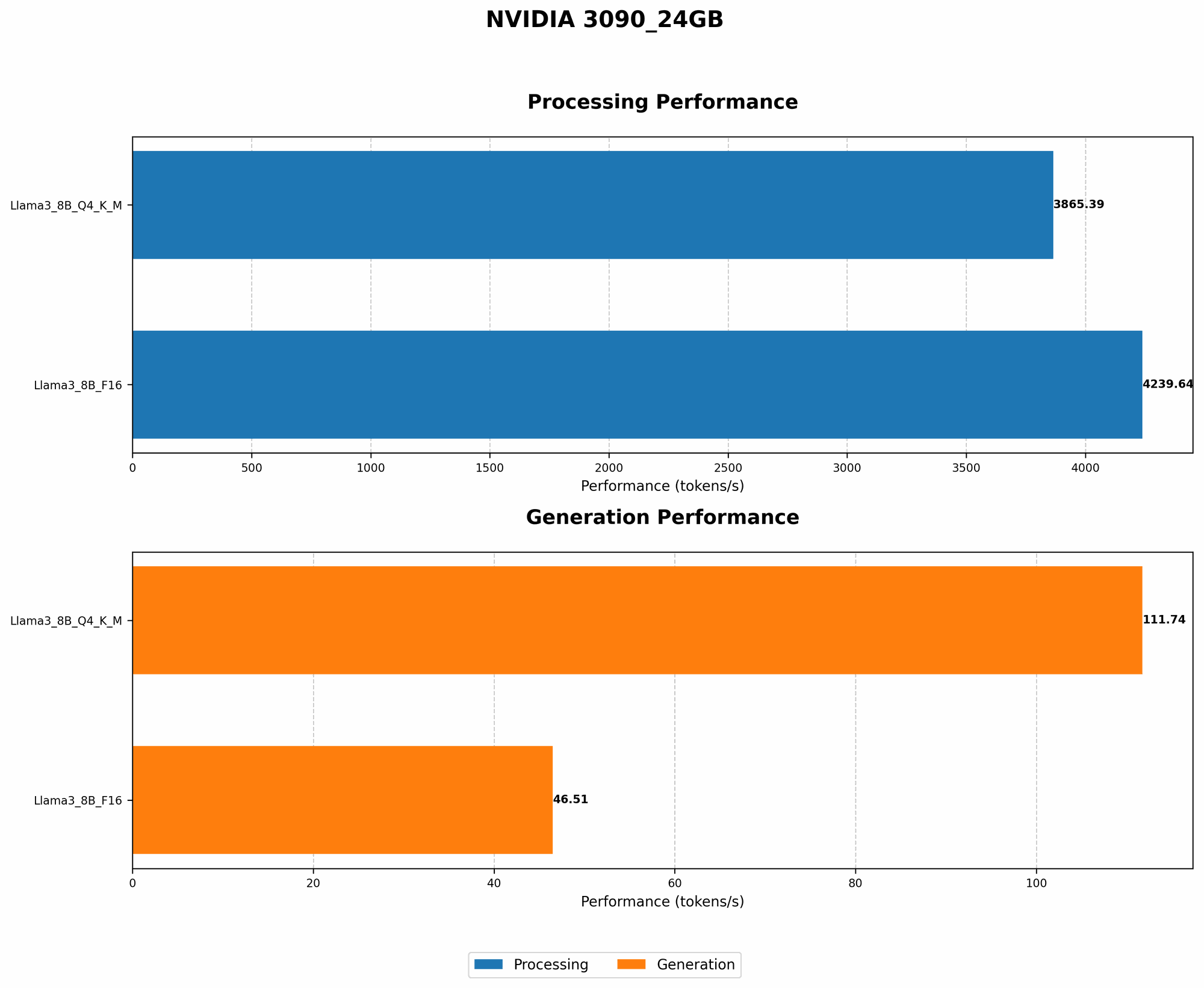
Let’s delve into a concrete example using the popular Llama 3 8B LLM model. Our NVIDIA 3090_24GB can handle this model with gusto, but we can make it even more efficient.
| Model Configuration | Token Speed (tokens/second) | Processing Speed (tokens/second) |
|---|---|---|
| Llama 3 8B F16 | 46.51 | 4239.64 |
| Llama 3 8B Q4KM | 111.74 | 3865.39 |
The 8B Llama 3 model in F16 format achieves a respectable token generation speed of 46.51 tokens/second on the 309024GB. However, by using Q4K_M quantization, we see a dramatic increase to 111.74 tokens/second – more than double the speed!
Key Takeaway: Quantization can be a game-changer in your AI lab, enabling you to accomplish more with the same hardware.
Strategy 2: Leverage Open-Source Models and Libraries
The world of open-source AI is exploding with incredible resources, offering you access to powerful models and libraries without the expense of proprietary software. This open-source generosity allows you to focus on your scientific endeavors without getting bogged down in licensing fees.
Open Source Models: A Treasure Trove of Resources
Here are a few popular open-source models that thrive on the NVIDIA 3090_24GB:
- Llama 3: Llama 3 models, including the popular 8B and 70B variants, offer exceptional performance for tasks like text generation, translation, and question answering. This is like having a multilingual friend who can understand your questions and provide thoughtful responses.
- Bloom: This 176B parameter model thrives on the 3090_24GB. It's a powerful tool for natural language understanding and generation, capable of engaging in meaningful conversations and producing highly creative text formats.
Explore Open-Source Libraries
- Hugging Face Transformers: This extensive library provides pre-trained models for various NLP tasks, streamlining your development process and helping you get up and running in no time. It's like having a librarian who can help you find exactly the right book for your research.
- llama.cpp: This efficient inference library allows you to run LLMs on your NVIDIA 3090_24GB with minimal overhead. It's all about making those AI calculations as smooth and speedy as possible.
Key Takeaway: Empower yourself with the vast resources available in the open-source community. It's like having a whole team of AI experts working with you for free!
Strategy 3: Utilize Cloud Computing For Scalability
Cloud computing offers a cost-effective solution when you need a sudden burst of processing power for a large task. Instead of investing in expensive hardware that might collect dust most of the time, cloud providers like Google Cloud, AWS, and Azure allow you to rent computing resources on demand. It's like having a shared workspace where you can borrow the tools you need when you need them.
Cloud for Large-Scale Training and Inference
- Scalable Resources: Cloud platforms provide a flexible way to scale your AI workloads. Need a lot of processing power for a massive training run? No problem! Need a small cluster for quick inference? Done. Cloud services adapt to your needs.
- Cost Optimization: Pay only for the computing resources you use, avoiding the upfront costs of purchasing expensive hardware. You only pay for what you need, making it super efficient.
- Easy Deployment: Cloud platforms simplify the deployment of your AI models, enabling you to make them readily available to users. It's like having a dedicated delivery service for your AI applications.
Key Takeaway: Cloud computing provides a flexible and cost-effective way to handle large-scale AI tasks. It's like having a magic wand that can instantly scale your AI lab!
Strategy 4: Optimize Your Code for Performance
Just like a finely tuned engine, your code needs to be optimized to maximize the performance of your NVIDIA 3090_24GB. Poorly written code can lead to bottlenecks and slowdowns, negating the power of your hardware. It's like having a race car that's stuck in first gear!
Optimization Techniques
- Profiling: Identify performance bottlenecks in your code using profiling tools. This is like checking your car's engine to see what's causing the lag.
- Vectorization: Take advantage of the NVIDIA 3090_24GB's parallel processing capabilities by using vectorized operations. This is like putting all the cylinders in your car to work together, maximizing efficiency.
- Memory Management: Efficiently manage memory allocation and access to avoid unnecessary overhead. Think of it as keeping your car's fuel tank full and running smoothly.
Key Takeaway: Optimized code unlocks the full potential of your NVIDIA 3090_24GB, leading to faster execution times and greater productivity.
Strategy 5: Participate in the AI Community and Collaborate
The AI community is a thriving ecosystem of developers, researchers, and enthusiasts who are constantly sharing knowledge and building new tools. Joining this community can provide invaluable support, insights, and collaborations that can enhance your AI lab.
Benefits of Community Participation
- Knowledge Sharing: Learn from others' successes and failures, gaining valuable insights and avoiding common pitfalls. It's like having a collective knowledge base for your AI journey.
- Collaboration: Join forces with other developers to tackle complex projects, share resources, and learn from each other's expertise. It's like forming an AI dream team for your projects!
- Stay Up-to-Date: Stay informed about the latest advancements in AI, new models, and emerging tools. It's like subscribing to an AI newsletter that delivers the latest and greatest news directly to your inbox.
Key Takeaway: Engage with the AI community. Sharing knowledge and collaborating can be a powerful way to accelerate your AI journey and reduce costs through collective innovation.
Conclusion
Building an AI lab with an NVIDIA 3090_24GB can be an exciting and rewarding experience. By employing these cost-saving strategies, you can maximize your investment and achieve exceptional AI results without breaking the bank. It's all about being smart with your resources and leveraging the power of the community to build cutting-edge AI solutions.
FAQ
What is quantization, and how does it work?
Quantization is a process of reducing the precision of numbers in a neural network model. Think of it like rounding off numbers. It's like using a ruler with fewer subdivisions to measure something. While it introduces a slight loss of accuracy, it dramatically reduces model size and improves performance.
What are the different types of quantization?
There are various quantization methods, including Post-Training Quantization (PTQ) and Quantization-Aware Training (QAT). PTQ is a simpler approach that uses the trained model to determine the quantization parameters. QAT incorporates quantization in the training process to improve accuracy.
What are some common open-source models for LLMs?
Popular open-source LLMs include Llama 3, Bloom, GPT-Neo, and GPT-J. These models are released under open-source licenses, allowing researchers and developers to use and modify them freely.
What are some ways to optimize my code for AI tasks?
Code optimization techniques include profiling to identify bottlenecks, vectorizing operations to leverage parallel processing, and efficiently managing memory allocation. These techniques are similar to optimizing engine performance for your car!
Keywords
LLMs, AI, NVIDIA 3090_24GB, cost-saving, quantization, open-source, cloud computing, code optimization, AI community, Llama 3, Bloom, Hugging Face Transformers, llama.cpp, GPU, token speed, processing speed, inference, training, model size, memory efficiency, parallel processing.