5 Cooling Solutions for 24 7 AI Operations with NVIDIA A40 48GB
Introduction
The world of large language models (LLMs) is exploding with the rise of powerful conversational AI tools like ChatGPT and Bard. But running these models on your own hardware takes serious processing power and can generate a lot of heat. This is particularly true if you're planning to run your LLM 24/7 for continuous learning and development.
Enter the NVIDIA A4048GB, a powerhouse GPU designed for demanding workloads, including LLM inference. This guide will dive into five cooling solutions specifically tailored for keeping your A4048GB humming along, even when it's under the heavy strain of running large language models.
LLM Performance on the A40_48GB: A Deep Dive
Before diving headfirst into cooling solutions, let's first explore the A4048GB's capabilities in handling LLMs. We'll be focusing on the Llama3 model, a prominent open-source option, and analyzing its performance on the A4048GB in both its 8B and 70B variants.
Quantization: Making LLMs More Efficient
Before we get to the numbers, let's quickly discuss "quantization." Think of it as putting an LLM on a diet: a way to reduce the size of the model, making it more manageable and faster to work with. This is achieved by representing numbers in the model with fewer bits, like replacing a full meal with a snack.
There are different "quantization levels." For example, Q4 means using 4 bits to represent each number, which is more lightweight than using 16 bits (F16). This means you can potentially fit more of your LLM on the GPU's memory and make it work even faster!
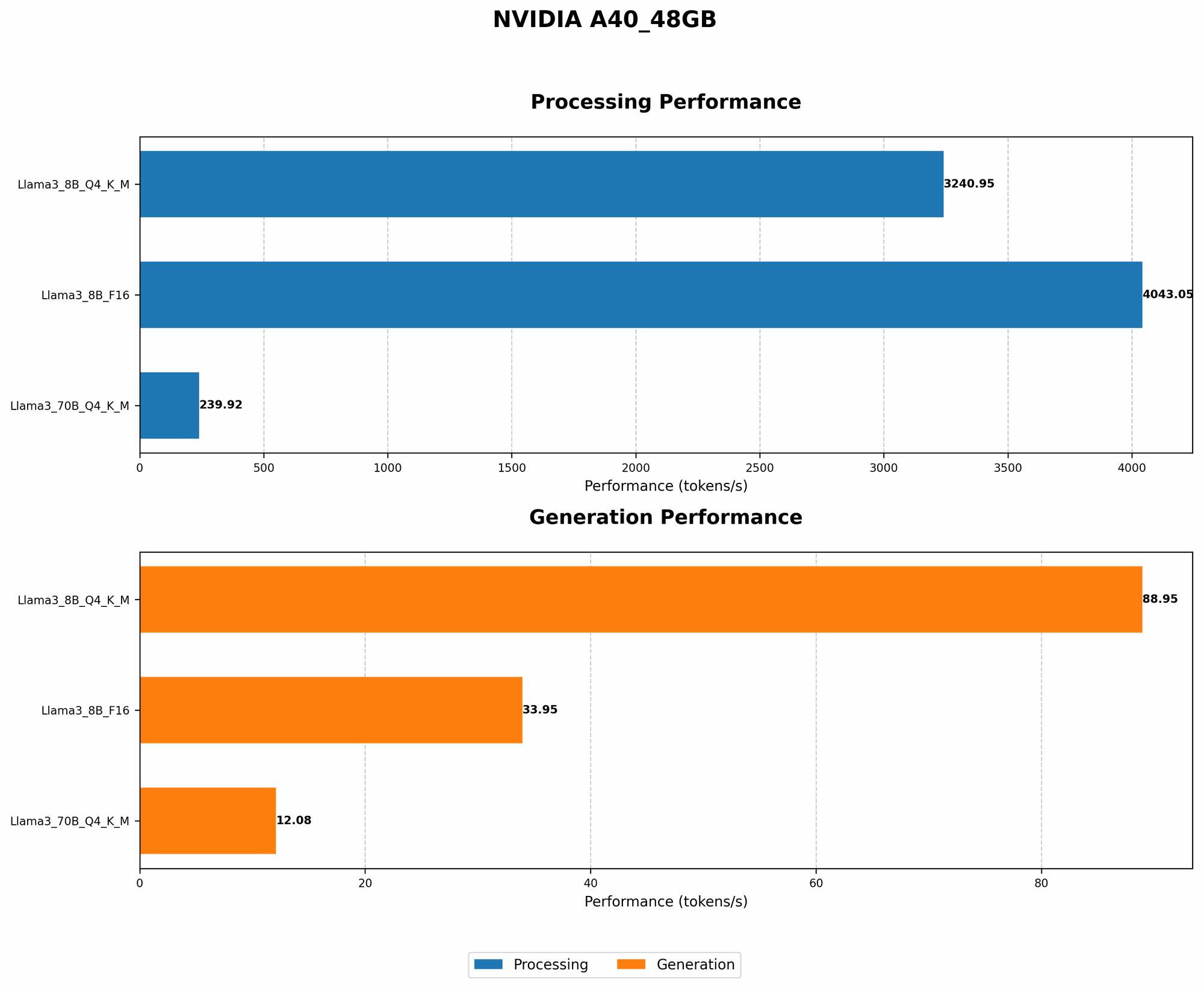
Token Speed Comparison of A40_48GB with Llama3 8B and 70B
| Model | Quantization | Tokens/Second (Generation) | Tokens/Second (Processing) |
|---|---|---|---|
| Llama3 8B | Q4KM | 88.95 | 3240.95 |
| Llama3 8B | F16 | 33.95 | 4043.05 |
| Llama3 70B | Q4KM | 12.08 | 239.92 |
| Llama3 70B | F16 | N/A | N/A |
Key observations:
- Quantization Matters: The Llama3 8B model, when quantized using Q4KM, significantly outperforms the F16 variant in terms of tokens processed per second. This highlights the crucial role of quantization for efficient LLM operation.
- The 70B Gap: The Llama3 70B model faces a performance bottleneck due to its larger size, even with Q4KM. The F16 variant, unfortunately, does not produce any data, suggesting that the A40_48GB might struggle to handle it effectively.
- Processing vs. Generation: The A40_48GB exhibits a noticeable performance difference between LLM generation and processing. This suggests that the GPU's architecture may be optimized for processing tasks, which might be crucial for building and refining LLMs.
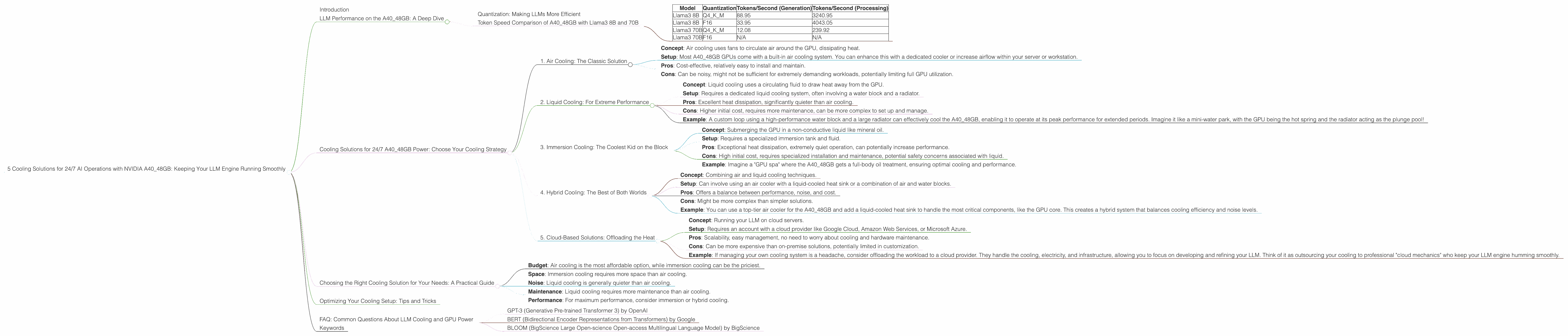
Cooling Solutions for 24/7 A40_48GB Power: Choose Your Cooling Strategy
Now that we've seen the A40_48GB in action, let's move on to the crucial part: keeping this workhorse cool for 24/7 operation. Here are five different cooling solutions, each with its own advantages and considerations:
1. Air Cooling: The Classic Solution
- Concept: Air cooling uses fans to circulate air around the GPU, dissipating heat.
- Setup: Most A40_48GB GPUs come with a built-in air cooling system. You can enhance this with a dedicated cooler or increase airflow within your server or workstation.
- Pros: Cost-effective, relatively easy to install and maintain.
- Cons: Can be noisy, might not be sufficient for extremely demanding workloads, potentially limiting full GPU utilization.
2. Liquid Cooling: For Extreme Performance
- Concept: Liquid cooling uses a circulating fluid to draw heat away from the GPU.
- Setup: Requires a dedicated liquid cooling system, often involving a water block and a radiator.
- Pros: Excellent heat dissipation, significantly quieter than air cooling.
- Cons: Higher initial cost, requires more maintenance, can be more complex to set up and manage.
- Example: A custom loop using a high-performance water block and a large radiator can effectively cool the A40_48GB, enabling it to operate at its peak performance for extended periods. Imagine it like a mini-water park, with the GPU being the hot spring and the radiator acting as the plunge pool!
3. Immersion Cooling: The Coolest Kid on the Block
- Concept: Submerging the GPU in a non-conductive liquid like mineral oil.
- Setup: Requires a specialized immersion tank and fluid.
- Pros: Exceptional heat dissipation, extremely quiet operation, can potentially increase performance.
- Cons: High initial cost, requires specialized installation and maintenance, potential safety concerns associated with liquid.
- Example: Imagine a "GPU spa" where the A40_48GB gets a full-body oil treatment, ensuring optimal cooling and performance.
4. Hybrid Cooling: The Best of Both Worlds
- Concept: Combining air and liquid cooling techniques.
- Setup: Can involve using an air cooler with a liquid-cooled heat sink or a combination of air and water blocks.
- Pros: Offers a balance between performance, noise, and cost.
- Cons: Might be more complex than simpler solutions.
- Example: You can use a top-tier air cooler for the A40_48GB and add a liquid-cooled heat sink to handle the most critical components, like the GPU core. This creates a hybrid system that balances cooling efficiency and noise levels.
5. Cloud-Based Solutions: Offloading the Heat
- Concept: Running your LLM on cloud servers.
- Setup: Requires an account with a cloud provider like Google Cloud, Amazon Web Services, or Microsoft Azure.
- Pros: Scalability, easy management, no need to worry about cooling and hardware maintenance.
- Cons: Can be more expensive than on-premise solutions, potentially limited in customization.
- Example: If managing your own cooling system is a headache, consider offloading the workload to a cloud provider. They handle the cooling, electricity, and infrastructure, allowing you to focus on developing and refining your LLM. Think of it as outsourcing your cooling to professional "cloud mechanics" who keep your LLM engine humming smoothly.
Choosing the Right Cooling Solution for Your Needs: A Practical Guide
With so many options, how do you choose the best cooling solution for your A40_48GB? Here's a breakdown to help you find the perfect fit:
- Budget: Air cooling is the most affordable option, while immersion cooling can be the priciest.
- Space: Immersion cooling requires more space than air cooling.
- Noise: Liquid cooling is generally quieter than air cooling.
- Maintenance: Liquid cooling requires more maintenance than air cooling.
- Performance: For maximum performance, consider immersion or hybrid cooling.
Optimizing Your Cooling Setup: Tips and Tricks
1. Monitor Temperatures: Use monitoring software to track your A4048GB's temperature and ensure it stays within safe limits. 2. Clean Regularly: Dust and debris can build up over time and impede cooling effectiveness. 3. Adjust Fan Curves: Adjust fan settings for your air cooling system to match the load on your GPU. 4. Consider Overclocking: If you're running a powerful cooling solution, you might be able to safely overclock your A4048GB for a performance boost, but proceed with caution. 5. Use a Dedicated Cooling Pad: Consider a cooling pad for your workstation or laptop to provide extra airflow and prevent overheating.
FAQ: Common Questions About LLM Cooling and GPU Power
1. What is the ideal temperature for an A40_48GB GPU?
NVIDIA recommends keeping the A40_48GB below 85 degrees Celsius for optimal performance and longevity.
2. Why is cooling important for LLM models?
LLMs are computationally intensive, generating heat. Overheating can slow down performance, reduce accuracy, and even damage the GPU.
3. Can I use air cooling for a 24/7 LLM setup?
While air cooling is a good starting point, you might need a more robust solution like liquid cooling for optimal 24/7 operation, especially with larger LLMs.
4. How do I know if my A40_48GB is overheating?
Use monitoring software like NVIDIA's GeForce Experience or other GPU monitoring tools to track temperature readings.
5. What are some of the most popular LLM models?
Beyond Llama 3, popular options include:
- GPT-3 (Generative Pre-trained Transformer 3) by OpenAI
- BERT (Bidirectional Encoder Representations from Transformers) by Google
- BLOOM (BigScience Large Open-science Open-access Multilingual Language Model) by BigScience
Keywords
NVIDIA A40_48GB, GPU cooling, LLM, large language model, AI, 24/7 operation, air cooling, liquid cooling, immersion cooling, hybrid cooling, cloud computing, quantization, token speed, temperature monitoring, performance optimization