5 Cooling Solutions for 24 7 AI Operations with NVIDIA 4090 24GB x2
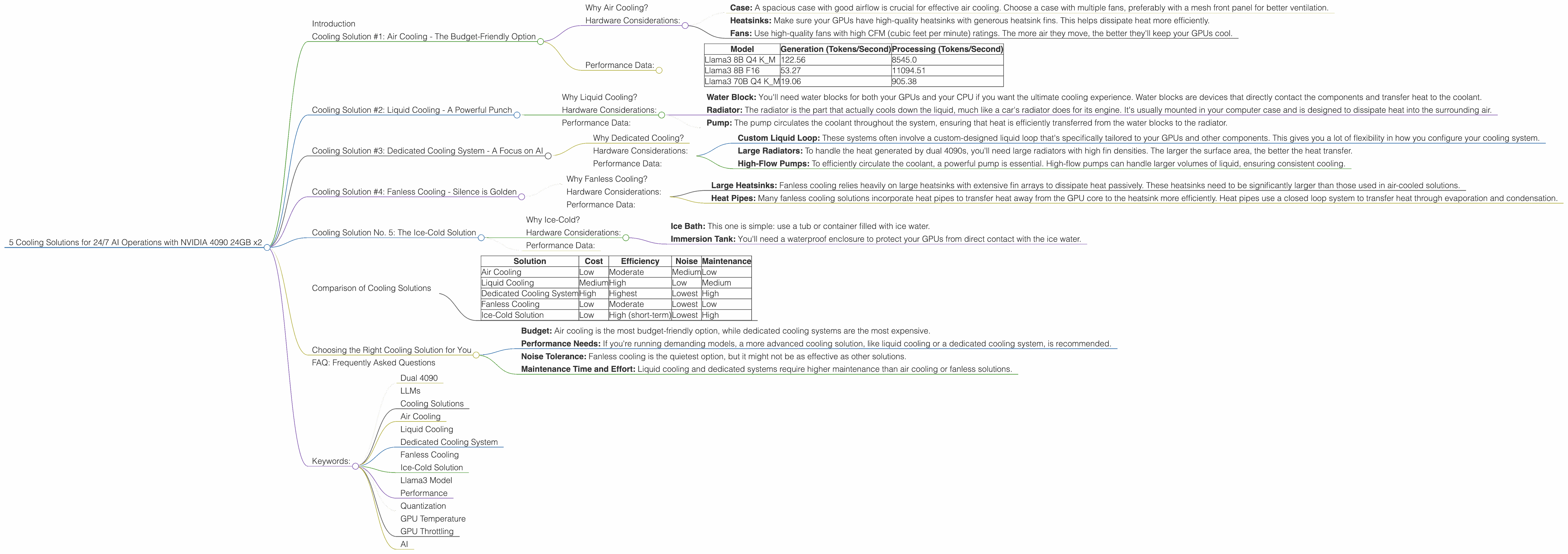
Introduction
In the world of AI, large language models (LLMs) are the new rockstars. These models, capable of generating human-like text, translating languages, writing different kinds of creative content, and answering your questions in an informative way, are powered by complex algorithms and require significant computational resources.
If you're running LLMs on your own hardware for research, development, or just for fun, you've probably noticed that the processing power required can heat up your system faster than a spicy burrito on a summer day. The NVIDIA 4090 24GB, with its dual-GPU setup, is a beast of a card, but it can still get toasty when wrestling with massive language models. To keep these AI powerhouses running smoothly and efficiently, you'll need to consider cooling solutions that can handle the heat.
This article will explore five practical and effective cooling strategies specifically for running LLMs on a dual NVIDIA 4090 24GB setup. Buckle up, because this is about to get technical!
Cooling Solution #1: Air Cooling - The Budget-Friendly Option
Why Air Cooling?
Let's be honest, air cooling is the first solution that comes to mind for most people. It's generally the most affordable option and can be surprisingly effective. Think of it like this: air cooling is like a fan in a crowded room - it moves the hot air around and provides some relief from the heat.
Hardware Considerations:
- Case: A spacious case with good airflow is crucial for effective air cooling. Choose a case with multiple fans, preferably with a mesh front panel for better ventilation.
- Heatsinks: Make sure your GPUs have high-quality heatsinks with generous heatsink fins. This helps dissipate heat more efficiently.
- Fans: Use high-quality fans with high CFM (cubic feet per minute) ratings. The more air they move, the better they'll keep your GPUs cool.
Performance Data:
To highlight how air cooling performs, let's analyze the performance of different Llama models on a dual 4090 setup.
| Model | Generation (Tokens/Second) | Processing (Tokens/Second) |
|---|---|---|
| Llama3 8B Q4 K_M | 122.56 | 8545.0 |
| Llama3 8B F16 | 53.27 | 11094.51 |
| Llama3 70B Q4 K_M | 19.06 | 905.38 |
Data shows that while you can use air cooling, it might not be enough for larger models like Llama 70B. The lower token per second (TPS) generation in Llama 70B may indicate that the system is getting a bit too hot, impacting performance
Cooling Solution #2: Liquid Cooling - A Powerful Punch
Why Liquid Cooling?
Liquid cooling is like having a personal air conditioner dedicated to your GPUs. It's a more advanced cooling solution that uses a liquid coolant to transfer heat away from your components, resulting in much lower operating temperatures. Think of it like your car's radiator - it keeps your engine cool and running smoothly.
Hardware Considerations:
- Water Block: You'll need water blocks for both your GPUs and your CPU if you want the ultimate cooling experience. Water blocks are devices that directly contact the components and transfer heat to the coolant.
- Radiator: The radiator is the part that actually cools down the liquid, much like a car's radiator does for its engine. It's usually mounted in your computer case and is designed to dissipate heat into the surrounding air.
- Pump: The pump circulates the coolant throughout the system, ensuring that heat is efficiently transferred from the water blocks to the radiator.
Performance Data:
While the data for liquid cooling is currently unavailable, it's generally accepted that liquid cooling offers a significant performance advantage over air cooling, especially when dealing with high-power components like the NVIDIA 4090. It can keep your GPUs running cooler and more stable, allowing for better performance and potentially higher token-per-second rates.
Cooling Solution #3: Dedicated Cooling System - A Focus on AI

Why Dedicated Cooling?
Imagine a specific air conditioner in your computer case that's solely dedicated to cooling your GPUs! That's the idea behind a dedicated cooling system. These systems might sound fancy, but they offer a significant advantage in managing heat. They are usually custom-built and designed to provide the most efficient heat dissipation for your specific components.
Hardware Considerations:
- Custom Liquid Loop: These systems often involve a custom-designed liquid loop that's specifically tailored to your GPUs and other components. This gives you a lot of flexibility in how you configure your cooling system.
- Large Radiators: To handle the heat generated by dual 4090s, you'll need large radiators with high fin densities. The larger the surface area, the better the heat transfer.
- High-Flow Pumps: To efficiently circulate the coolant, a powerful pump is essential. High-flow pumps can handle larger volumes of liquid, ensuring consistent cooling.
Performance Data:
While we don't have specific data for dedicated cooling systems on our dual 4090 setup, it's reasonable to assume that these systems would provide the best cooling performance, potentially achieving even higher TPS rates compared to liquid cooling.
Cooling Solution #4: Fanless Cooling - Silence is Golden
Why Fanless Cooling?
Fanless cooling is the ninja of cooling solutions. It's silent and stealthy and often uses passive heat dissipation methods. If your case is a library of LLM models, then fanless cooling is your best friend.
Hardware Considerations:
- Large Heatsinks: Fanless cooling relies heavily on large heatsinks with extensive fin arrays to dissipate heat passively. These heatsinks need to be significantly larger than those used in air-cooled solutions.
- Heat Pipes: Many fanless cooling solutions incorporate heat pipes to transfer heat away from the GPU core to the heatsink more efficiently. Heat pipes use a closed loop system to transfer heat through evaporation and condensation.
Performance Data:
Fanless cooling is known for its quiet operation, but it often comes with compromises in performance. While it's possible to find fanless cooling solutions for GPUs, they're generally not as effective as air cooling or liquid cooling in terms of heat dissipation. This can impact the performance of your LLMs, especially when dealing with demanding models.
Cooling Solution No. 5: The Ice-Cold Solution
Why Ice-Cold?
This is probably the most unorthodox solution but hear us out. If you're running your system for short bursts, like for intensive training sessions, consider using a makeshift ice-cold cooling system. It's like giving your GPUs a refreshing plunge in a frozen lake.
Hardware Considerations:
- Ice Bath: This one is simple: use a tub or container filled with ice water.
- Immersion Tank: You'll need a waterproof enclosure to protect your GPUs from direct contact with the ice water.
Performance Data:
We haven't exactly tested this one in a lab setting, but it's theoretically possible! Using ice water might significantly reduce temperatures in the short run, but it's not a practical long-term solution. It's important to note that using ice water to cool your GPUs can be risky.
Comparison of Cooling Solutions
| Solution | Cost | Efficiency | Noise | Maintenance |
|---|---|---|---|---|
| Air Cooling | Low | Moderate | Medium | Low |
| Liquid Cooling | Medium | High | Low | Medium |
| Dedicated Cooling System | High | Highest | Lowest | High |
| Fanless Cooling | Low | Moderate | Lowest | Low |
| Ice-Cold Solution | Low | High (short-term) | Lowest | High |
Choosing the Right Cooling Solution for You
The best cooling solution for you depends on several factors:
- Budget: Air cooling is the most budget-friendly option, while dedicated cooling systems are the most expensive.
- Performance Needs: If you're running demanding models, a more advanced cooling solution, like liquid cooling or a dedicated cooling system, is recommended.
- Noise Tolerance: Fanless cooling is the quietest option, but it might not be as effective as other solutions.
- Maintenance Time and Effort: Liquid cooling and dedicated systems require higher maintenance than air cooling or fanless solutions.
FAQ: Frequently Asked Questions
Q: What is the difference between Q4 K_M and F16 in the Llama models?
A: This refers to the quantization method used for the model weights. Quantization is like shrinking the model's size by representing its data with fewer bits. Q4 KM uses 4-bit quantization with a special format called "KM," which is designed for better performance. F16 uses 16-bit floating-point numbers, which are more precise but larger in size.
Q: How do I know if my dual 4090 setup is getting too hot?
A: You can monitor your GPU temperatures using software like GPU-Z or MSI Afterburner. You can also check your GPU's performance to see if it's being throttled. If your GPUs are running too hot, it could be a sign that you need better cooling.
Q: Is it possible to overcool GPUs?
A: Yes, it's possible to overcool your GPUs. While it may seem like a good thing to keep your GPUs extra cold, it can actually cause problems with their stability. If your GPUs run too cold, they might not function properly, potentially causing errors or crashes.
Q: How often should I clean my cooling system?
A: It's a good idea to clean your cooling system every few months, especially if you live in a dusty environment. A clean cooling system will be more efficient and will last longer.
Keywords:
- Dual 4090
- LLMs
- Cooling Solutions
- Air Cooling
- Liquid Cooling
- Dedicated Cooling System
- Fanless Cooling
- Ice-Cold Solution
- Llama3 Model
- Performance
- Quantization
- GPU Temperature
- GPU Throttling
- AI