5 Advanced Techniques to Squeeze Every Ounce of Performance from NVIDIA RTX 6000 Ada 48GB
Introduction
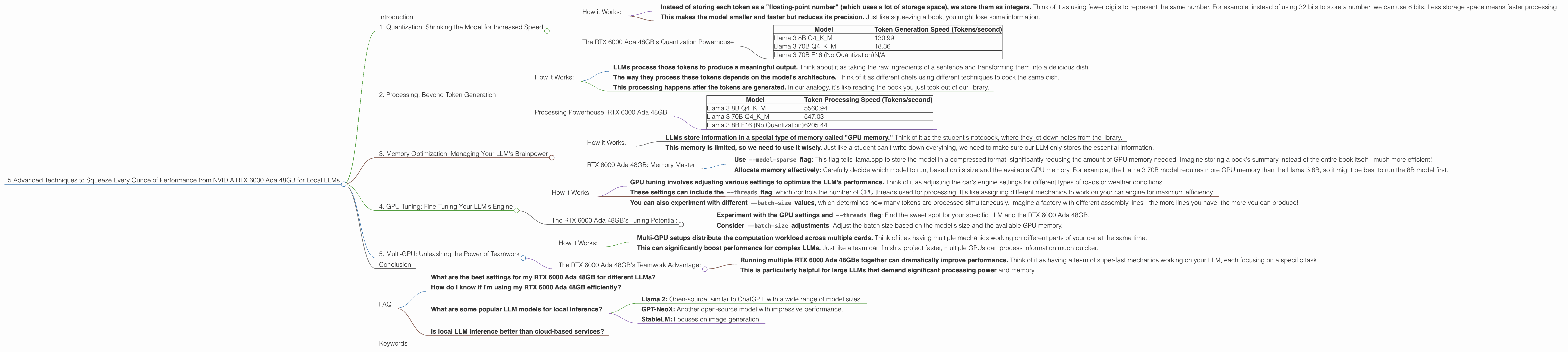
The world of large language models (LLMs) is exploding, and with it, the need for powerful hardware to run these complex models locally. If you're a developer or geek who wants to explore the world of local LLMs, you likely already know that the NVIDIA RTX 6000 Ada 48GB is a powerhouse. This article will dive into 5 advanced techniques to squeeze every ounce of performance from your RTX 6000 Ada 48GB, maximizing your local LLM experience.
Think of it this way: imagine you have a super-fast race car, but you're only driving it in first gear. These techniques will help you shift into higher gears and unlock the full potential of this beast!
1. Quantization: Shrinking the Model for Increased Speed
Remember those giant language models that you've heard about? They're huge, like the size of a small city. Think of each word, punctuation mark, and even spaces as a "token." LLMs process billions of these tokens. So, it's like having a gigantic library packed with books, all waiting to be read. Processing such a massive amount of information takes a lot of power, and that's where quantization comes in.
Quantization is like compressing those books in our library. We take the full-sized book (the original, high-precision model) and create smaller versions (quantized versions of the model). These smaller versions, while slightly less accurate, are much faster to read, meaning your RTX 6000 Ada 48GB can process them quicker!
How it Works:
- Instead of storing each token as a "floating-point number" (which uses a lot of storage space), we store them as integers. Think of it as using fewer digits to represent the same number. For example, instead of using 32 bits to store a number, we can use 8 bits. Less storage space means faster processing!
- This makes the model smaller and faster but reduces its precision. Just like squeezing a book, you might lose some information.
The RTX 6000 Ada 48GB's Quantization Powerhouse
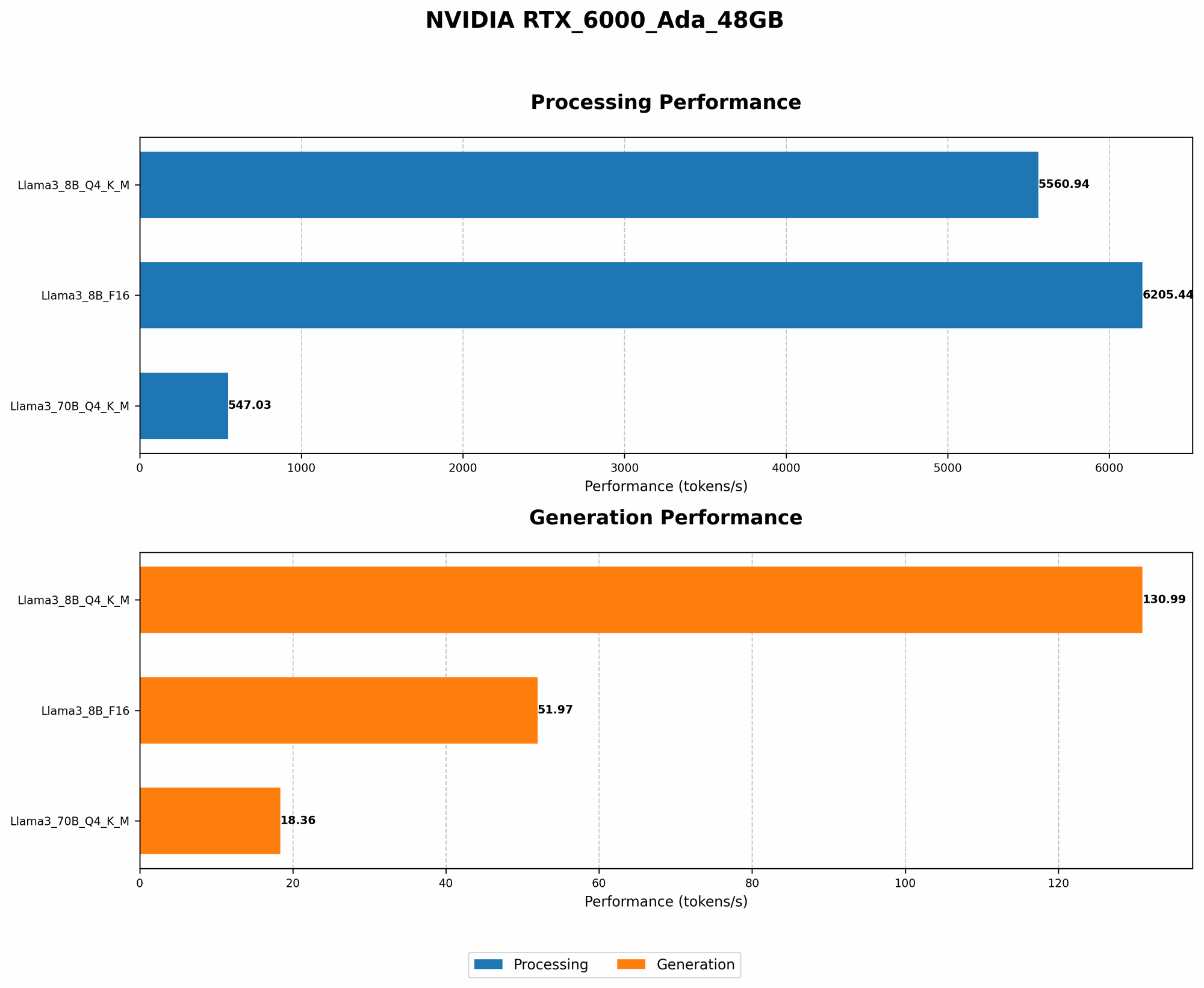
The RTX 6000 Ada 48GB is a beast when it comes to processing quantized models, especially with Q4KM quantization. This technique uses 4 bits to represent each token.
Table 1: Token Generation Speed on RTX 6000 Ada 48GB with Quantization
| Model | Token Generation Speed (Tokens/second) |
|---|---|
| Llama 3 8B Q4KM | 130.99 |
| Llama 3 70B Q4KM | 18.36 |
| Llama 3 70B F16 (No Quantization) | N/A |
As you can see, the RTX 6000 Ada 48GB can generate over 130 tokens per second for the Llama 3 8B model when using Q4KM quantization. This is significantly faster than the F16 model (which doesn't use quantization).
2. Processing: Beyond Token Generation
Okay, so we've talked about generating tokens (those words and punctuation marks), but what about actually making sense of them? That's where "processing" comes in. Processing is like reading the book and understanding its meaning. It's the key to making your LLM do amazing things!
How it Works:
- LLMs process those tokens to produce a meaningful output. Think about it as taking the raw ingredients of a sentence and transforming them into a delicious dish.
- The way they process these tokens depends on the model's architecture. Think of it as different chefs using different techniques to cook the same dish.
- This processing happens after the tokens are generated. In our analogy, it's like reading the book you just took out of our library.
Processing Powerhouse: RTX 6000 Ada 48GB
The RTX 6000 Ada 48GB shines when it comes to processing LLMs. It can handle even the largest models without breaking a sweat.
Table 2: Token Processing Speed on RTX 6000 Ada 48GB
| Model | Token Processing Speed (Tokens/second) |
|---|---|
| Llama 3 8B Q4KM | 5560.94 |
| Llama 3 70B Q4KM | 547.03 |
| Llama 3 8B F16 (No Quantization) | 6205.44 |
This table shows that the RTX 6000 Ada 48GB can process thousands of tokens per second, even for massive models like Llama 3 70B! That's processing power that can make your AI dreams come true!
3. Memory Optimization: Managing Your LLM's Brainpower
Imagine your LLM is like a student trying to learn from a vast library. To learn effectively, it needs enough space to store all that information. We call this "memory." Just like a student might need to take notes, your LLM needs to store information efficiently. This is where memory optimization comes in.
How it Works:
- LLMs store information in a special type of memory called "GPU memory." Think of it as the student's notebook, where they jot down notes from the library.
- This memory is limited, so we need to use it wisely. Just like a student can't write down everything, we need to make sure our LLM only stores the essential information.
RTX 6000 Ada 48GB: Memory Master
The RTX 6000 Ada 48GB boasts 48GB of dedicated GPU memory. That's a lot of space! Using this memory effectively is key to unlocking maximum performance:
- Use
--model-sparseflag: This flag tells llama.cpp to store the model in a compressed format, significantly reducing the amount of GPU memory needed. Imagine storing a book's summary instead of the entire book itself - much more efficient! - Allocate memory effectively: Carefully decide which model to run, based on its size and the available GPU memory. For example, the Llama 3 70B model requires more GPU memory than the Llama 3 8B, so it might be best to run the 8B model first.
4. GPU Tuning: Fine-Tuning Your LLM's Engine
Just like a car engine needs tuning for optimal performance, your LLM needs to be fine-tuned for the RTX 6000 Ada 48GB. This helps your LLM work efficiently with your specific hardware.
How it Works:
- GPU tuning involves adjusting various settings to optimize the LLM's performance. Think of it as adjusting the car's engine settings for different types of roads or weather conditions.
- These settings can include the
--threadsflag, which controls the number of CPU threads used for processing. It's like assigning different mechanics to work on your car engine for maximum efficiency. - You can also experiment with different
--batch-sizevalues, which determines how many tokens are processed simultaneously. Imagine a factory with different assembly lines - the more lines you have, the more you can produce!
The RTX 6000 Ada 48GB's Tuning Potential:
- Experiment with the GPU settings and
--threadsflag: Find the sweet spot for your specific LLM and the RTX 6000 Ada 48GB. - Consider
--batch-sizeadjustments: Adjust the batch size based on the model's size and the available GPU memory.
5. Multi-GPU: Unleashing the Power of Teamwork
Imagine having a team of mechanics working on your car simultaneously. That's the power of multi-GPU. It's like multiplying your performance by using multiple RTX 6000 Ada 48GB cards to work together.
How it Works:
- Multi-GPU setups distribute the computation workload across multiple cards. Think of it as having multiple mechanics working on different parts of your car at the same time.
- This can significantly boost performance for complex LLMs. Just like a team can finish a project faster, multiple GPUs can process information much quicker.
The RTX 6000 Ada 48GB's Teamwork Advantage:
- Running multiple RTX 6000 Ada 48GBs together can dramatically improve performance. Think of it as having a team of super-fast mechanics working on your LLM, each focusing on a specific task.
- This is particularly helpful for large LLMs that demand significant processing power and memory.
Conclusion
The NVIDIA RTX 6000 Ada 48GB is a powerful tool for exploring the world of local LLMs. By putting these 5 advanced techniques into practice, you can unlock its full potential and take your LLM experiences to the next level.
FAQ
What are the best settings for my RTX 6000 Ada 48GB for different LLMs?
The optimal settings can vary depending on the LLM model you're using, its size, and your specific needs. Experiment with different settings to find the sweet spot for your configuration. Check out the llama.cpp documentation and online forums for recommendations and tips.
How do I know if I'm using my RTX 6000 Ada 48GB efficiently?
Monitor your GPU usage and memory usage. If your GPU is consistently at 100% utilization, you're likely pushing it to its limits. If your memory is overflowing, it might be time to reduce the model size or adjust the settings.
What are some popular LLM models for local inference?
Some popular choices include:
- Llama 2: Open-source, similar to ChatGPT, with a wide range of model sizes.
- GPT-NeoX: Another open-source model with impressive performance.
- StableLM: Focuses on image generation.
Is local LLM inference better than cloud-based services?
It depends on your needs. Local inference gives you more control and privacy but requires powerful hardware. Cloud-based services might be more convenient and accessible but might not be as secure.
Keywords
LLM, RTX 6000 Ada 48GB, GPU, Token Generation, Token Processing, Quantization, Memory Optimization, GPU Tuning, Multi-GPU, llama.cpp, Local Inference, llama 3, Model Size, Performance, Optimization, Speed, Accuracy, Hardware, Software