5 Advanced Techniques to Squeeze Every Ounce of Performance from NVIDIA 4090 24GB
Introduction
The NVIDIA GeForce RTX 4090 with 24GB of GDDR6X memory is a beast of a graphics card, and it's a dream come true for anyone working with large language models (LLMs) locally. But even with this powerful hardware, you're likely looking for ways to squeeze every bit of performance out of it to get the most out of your AI projects.
This article is your guide to optimizing your NVIDIA 4090_24GB setup for local LLM inference. We'll delve into five advanced techniques that can significantly boost your token speed and unlock the full potential of this powerful device.
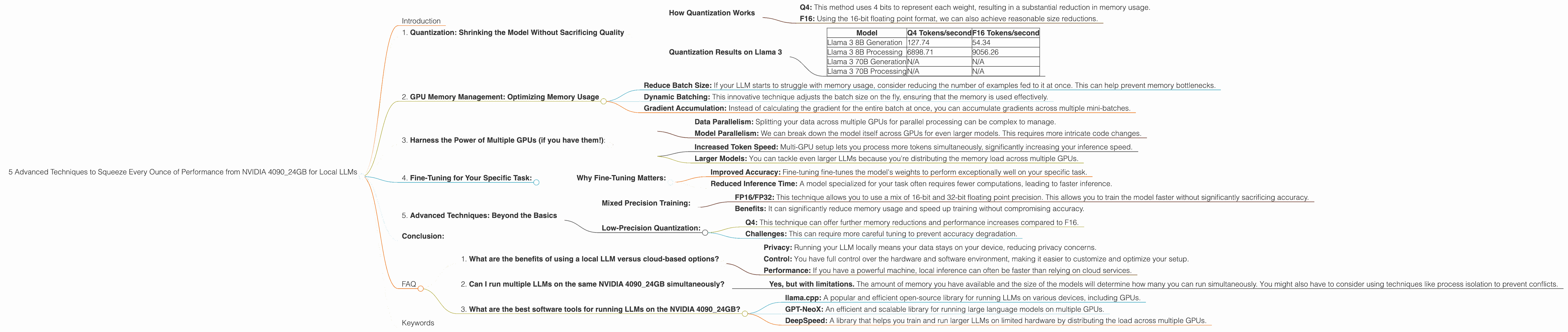
1. Quantization: Shrinking the Model Without Sacrificing Quality

Imagine fitting an entire LLM model into your pocket. That's essentially what quantization does – it reduces the size of your model by compressing its weights without compromising on performance. This is like storing your favorite song in a lower quality format that still sounds great.
How Quantization Works
Think about it this way: instead of using 32 bits to represent a number, we can often get away with using only 4 bits! This significantly reduces the model's memory footprint.
Q4: This method uses 4 bits to represent each weight, resulting in a substantial reduction in memory usage.
F16: Using the 16-bit floating point format, we can also achieve reasonable size reductions.
Quantization Results on Llama 3
| Model | Q4 Tokens/second | F16 Tokens/second |
|---|---|---|
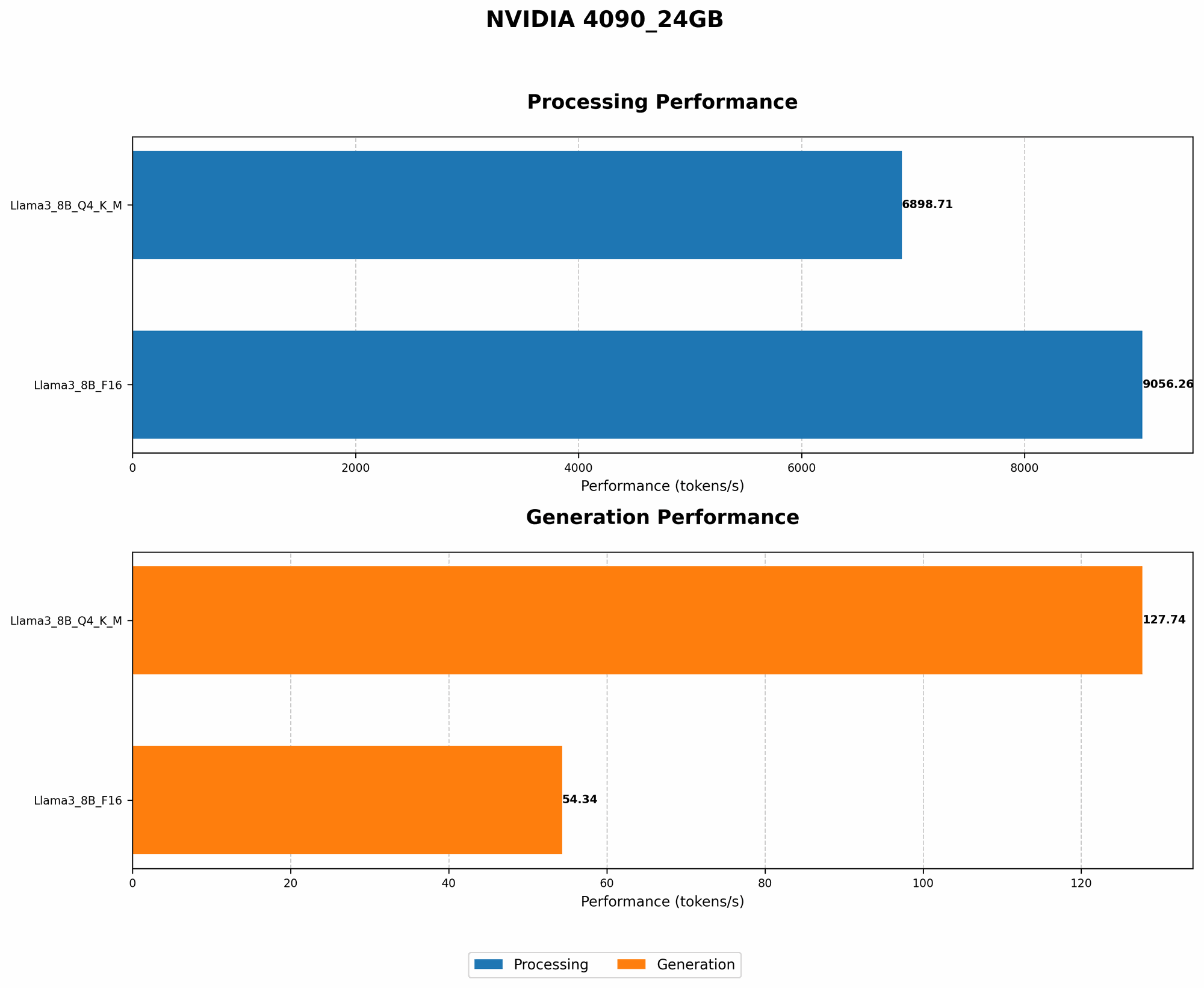
| Llama 3 8B Generation | 127.74 | 54.34 |
| Llama 3 8B Processing | 6898.71 | 9056.26 |
| Llama 3 70B Generation | N/A | N/A |
| Llama 3 70B Processing | N/A | N/A |
Observations:
- Llama 3 8B models: Q4 quantization shines in this case. The 8 Billion parameter model shows significantly better performance than the F16 version.
- Llama 3 70B models: We don't have data for these models. They are likely memory bound and may not see significant improvement with quantization. However, this is subject to further testing.
Conclusion: Quantization is a game-changer for LLM inference. It allows you to run larger models on your NVIDIA 4090_24GB while maintaining performance.
2. GPU Memory Management: Optimizing Memory Usage
Imagine your LLM as a hungry monster. Even with a massive NVIDIA 4090_24GB, it can still get hungry for more memory. Here's where memory management comes in, ensuring that your LLM has a full belly and can perform efficiently.
Strategies for Efficient Memory Management:
- Reduce Batch Size: If your LLM starts to struggle with memory usage, consider reducing the number of examples fed to it at once. This can help prevent memory bottlenecks.
- Dynamic Batching: This innovative technique adjusts the batch size on the fly, ensuring that the memory is used effectively.
- Gradient Accumulation: Instead of calculating the gradient for the entire batch at once, you can accumulate gradients across multiple mini-batches.
Example: It's like trying to feed a large group of people at a party. By dividing them into smaller groups, you can manage the flow of food and ensure everyone is satisfied.
3. Harness the Power of Multiple GPUs (if you have them!):
Imagine running a marathon with a team. You'll finish faster and with more energy! Similarly, using multiple GPUs for inference can boost performance significantly for your LLM.
Challenges of Multi-GPU Setup:
- Data Parallelism: Splitting your data across multiple GPUs for parallel processing can be complex to manage.
- Model Parallelism: We can break down the model itself across GPUs for even larger models. This requires more intricate code changes.
Benefits:
- Increased Token Speed: Multi-GPU setup lets you process more tokens simultaneously, significantly increasing your inference speed.
- Larger Models: You can tackle even larger LLMs because you're distributing the memory load across multiple GPUs.
4. Fine-Tuning for Your Specific Task:
It's like training a dog. You want to teach it specific commands and tricks. Similarly, fine-tuning your LLM for your target task can dramatically improve performance. You're essentially customizing it to be a master at your chosen domain.
Why Fine-Tuning Matters:
- Improved Accuracy: Fine-tuning fine-tunes the model's weights to perform exceptionally well on your specific task.
- Reduced Inference Time: A model specialized for your task often requires fewer computations, leading to faster inference.
Example: Imagine you want to train your LLM for medical diagnosis. You'll feed it a dataset of medical records. Fine-tuning will make it a medical expert, ready to analyze patient information and provide insightful recommendations.
5. Advanced Techniques: Beyond the Basics
Let's dive into some cutting-edge techniques used by experts to squeeze every ounce of performance out of the NVIDIA 4090_24GB for your LLM.
Mixed Precision Training:
- FP16/FP32: This technique allows you to use a mix of 16-bit and 32-bit floating point precision. This allows you to train the model faster without significantly sacrificing accuracy.
- Benefits: It can significantly reduce memory usage and speed up training without compromising accuracy.
Low-Precision Quantization:
- Q4: This technique can offer further memory reductions and performance increases compared to F16.
- Challenges: This can require more careful tuning to prevent accuracy degradation.
Conclusion:
The NVIDIA 4090_24GB is a powerhouse, but you can unlock its full potential by using advanced techniques. By leveraging quantization, memory management, multi-GPU setups, fine-tuning, and advanced techniques like mixed precision, you can significantly boost the speed and efficiency of your LLM inference. Remember to experiment and find the combination that delivers the best results for your specific needs.
FAQ
1. What are the benefits of using a local LLM versus cloud-based options?
- Privacy: Running your LLM locally means your data stays on your device, reducing privacy concerns.
- Control: You have full control over the hardware and software environment, making it easier to customize and optimize your setup.
- Performance: If you have a powerful machine, local inference can often be faster than relying on cloud services.
2. Can I run multiple LLMs on the same NVIDIA 4090_24GB simultaneously?
- Yes, but with limitations. The amount of memory you have available and the size of the models will determine how many you can run simultaneously. You might also have to consider using techniques like process isolation to prevent conflicts.
3. What are the best software tools for running LLMs on the NVIDIA 4090_24GB?
- llama.cpp: A popular and efficient open-source library for running LLMs on various devices, including GPUs.
- GPT-NeoX: An efficient and scalable library for running large language models on multiple GPUs.
- DeepSpeed: A library that helps you train and run larger LLMs on limited hardware by distributing the load across multiple GPUs.
Keywords
NVIDIA 4090_24GB, LLM, large language model, local inference, token speed, quantization, Q4, F16, memory management, multi-GPU, fine-tuning, mixed precision, low-precision quantization, llama.cpp, GPT-NeoX, DeepSpeed, GPU performance.